Skip to content

Blog

Architecting GCP Solutions for Security and Legal Compliance

Identity and Access Management or IAM is a service which lets you specify which users can perform which actions in the cloud. IAM includes the following objects:

  • Identities and Groups
  • Resources
  • Permissions
  • Roles
  • Policies

Identities users and service accounts, groups are collections of those. The Identity entity itself is the thing which is granted access. When you perform any actions in GCP, you must first authenticate against an identity, either on the Console or with the gcloud command. Identities are also called ‘members’. There are three kinds of core identities: Google account, Service Accounts, and Cloud Identity Domains.

Google accounts are members that represent users who access resources in GCP. Active directory users often are synced as Google accounts. Service accounts are accounts systems and programs use. Your terraform instances in an Enterprise environment might be created by a service account with the appropriate IAM roles or permissions to do so. Service accounts are denoted by a service account id in projects/{{project}}/serviceAccounts/{{email}} notation, or email notation sa-name@iam.gserviceaccounts.com. GKE service accounts are the same as compute service accounts. All compute operations run as the default compute service account.

Cloud Identity is an Identity as a service managed product which creates identities that are not tied to Google accounts. You can interface this with Active Directory OIDC and SAML.
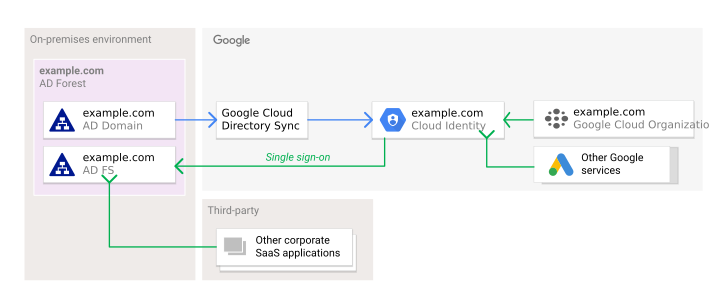
Federating Google Cloud with Active Directory

Groups are collections of Identities belonging together. A group is the object that binds the members or the entity they’re associated with. The kind of members of a Google Group in IAM are service accounts and Google accounts. G Suite users and domains are group identities in GCP.

All of these: identities, groups and service accounts can be granted permissions or roles on Resources. A Resource is any GCP object.

Resources:

  • Compute Instances
  • Storage Buckets
  • GSM Secrets
  • Projects
  • etc…

Every resource has both granular permissions that correspond to any action that can be done on that resource and predefined roles which represent workloads a person may be assigned with regard to the resource(i.e. developer, viewer, administrator).

Permissions correspond to specific actions like getting, listing, or deleting a resource.

Cloud Run IAM permissions examples:

PermissionDescription
run.services.getView services, excluding IAM policies.
run.services.listList services.
run.services.createCreate new services.
run.services.updateUpdate existing services.
run.services.deleteDelete services.
run.services.getIamPolicyGet an IAM policy.
run.services.setIamPolicySet an IAM policy.

In Enterprise level companies, these fine grained permissions are more often used. Small companies may use the roles or even basic roles. If you’re going for a least privilege principal of access, then steering clear of the roles and only granting permissions will provide this. You’ll collect job roles from the team, and consider the privileges needed to do that work. Secrets accessor can be granted on the project level or the secret level. Enterprise companies will want to place it on the secret level. They’ll want to group the secrets to a service which accesses it and create a specific service account it will impersonate so that only that service can access it secrets and not the secrets of other services. The exam will not require you to know the permissions, however, knowing how granular they can be is what the exam creators will expect GCP Certified Architect’s to know.

Roles are groups of these permissions bound together in a role which you assign to an identity or group in order to grant access. Identities can have multiple roles. Roles apply across the project.

Cloud Run IAM predefined roles examples:

RolePermissionDescription
(roles/run.developer)
(roles/run.developer)run.jobs.createCreate Cloud Run jobs
(roles/run.developer)run.jobs.deleteDelete Cloud Run jobs
(roles/run.developer)run.jobs.getGet Cloud Run jobs
(roles/run.developer)run.jobs.listList cloud Run jobs
(roles/run.developer)run.jobs.runRun a job in Cloud Run
(roles/run.developer)run.jobs.updateUpdate a Cloud Run job
(roles/run.developer)so on and so forth

Applying these to an identity can be done at the Org, Folder or Project level and would apply to all sub resources in one of those three. Predefined roles are those like the above example. They pre-exist and are pre-defined collections of permissions. Other kinds of roles exist named basic roles which were the roles that existed before IAM. Basic roles apply to every resource and are Viewer, Editor, and Owner. The Viewer role gives read only access to resources, the editor grants change and delete access to resources which the Owner role inherits. Additionally the Owner role can assign roles and manage permissions to resources.

You can grant basic roles per resource so you can make on identity or group owner over certain Compute Managed Instance Groups while giving Owner to other MIGs. Owner role over resources allows users to set up a billing account for those resources. Its best to consider basic roles legacy and avoid them when possible.

Custom roles are those which are created by you where you group a permissions set into a custom role which you grant to identities or groups. This can help you adhere closer to the lease privilege access principle. Some developer roles allow you to set anything in a space where sometimes a thing should be restricted, like production. You would use a custom role to include all the things that a developer role has without the ability to write code and instead limit writes only to pull requests to the master branch.

Policies are Json definitions or directives called a binding which specifies which identities are bound to which roles and permissions. The IAM API allows you to set or get policies and test permissions. Policies can be set on the Organization, individual projects or folders of projects and are inherited infinitely deep.

IAM also has Conditions that are written in a logic language called CEL that is a versatile way to define access granting logic so that things like resource tagging may trigger granting access to certain groups over that resource based simply upon its attributes. Conditions can apply to the following services:

  • Cloud Storage
  • Compute Engine
  • Cloud KMS
  • GSM
  • Resource Manager
  • Cloud SQL
  • Bigtable
  • IAP

Google recommends these best practices for using IAM in a secure way.

  • Do not ever use Basic roles in production
  • Consider each layer of workload of your app is untrusted, give each one its own serviceaccount and grant only the permissions the app needs.
  • Consider that all child Resources inherit the permissions of their parent Resources. Don’t grant project level roles when Resource level roles will suffice.
  • Grant permissions or roles on the smallest scope needed.
  • Specify who can impersonate which service accounts
  • Limit who can create and access service accounts.
  • Take care who you grant Project IAM Admin and Folder IAM Admin
  • Conditional bindings can allow access to expire
  • Consider granting privileged access only on a just-in-time basis.
  • Rotate your service account keys using the IAM service account API.

  • Label the service account with a deploy name that tells you about what it is for and what it has access to.

  • Don’t leave the service account keys in email, check them into code, or leave them in the Downloads directory.

  • Audit changes to your policies with Cloud Audit Logs

  • Export logs to Cloud Storage for preservation

  • Audit who has the ability to change your allow policies on your projects.

  • Limit access to logs per least privilege principles

  • Use the Cloud Audit Logs to audit who has service account key access

  • If identities need to access all projects in an organization, grant access at the organization level.
  • Use groups instead of users when possible.

Bad Actors will look for Service Account Keys in these locations:

  • Source code repositories of open-source projects
  • Public Cloud Storage buckets
  • Public data dumps of breached services
  • Compromised Email inboxes
  • File shares
  • Backup storage
  • Temporary file system directories

IAP are Layer 7 proxies which are capable of allowing or denying HTTP(S) requests based on IAM policy and identity membership. If a user making the request doesn’t have an identity associated with it, the user will be redirected to a Google Oath page to sign into to a Google account or single signon account. Once an identity is associated with the request, and if the identity is allowed to access the resource, then the IAP forwards the connection to its destination.

Using IAP Proxies in front of app are ways you can limit access to parts or all of your application based on Google account. IAP for On-Premises Apps is Googles way of protecting Apps in Hybrid-Cloud Networking environments with IAM.

Workload Identity is a way to grant IAM roles and permissions to external identities. If you want a Kubernetes service account to have certain permissions in GCP, the secretAccessor role for instance, workload identity federation is the IAM feature which will allow you to do that. Workload Identity providers do the magic of connecting the external entity to the workload defined. These providers either use SAML or OAuth 2.0 token exchange.

Providers supported:

  • AWS
  • Azure Active Directory
  • On-premises Active Directory
  • Okta
  • Kubernetes clusters

Organizations can have limits placed on them for any number of attributes of the org’s resources. You can prevent certain actions from being taken by identities or service accounts. For instance, if you want all CloudFunctions to work through the VPC in a given project, you can create and then apply a constraint against constraints/cloudfunctions.requireVPCConnector. Depending on the constraint, it may apply to a set o Google services, or to specific services. You can find a full list here.

Encryption is the process of masquerading data that is in one form into another form using encoding algorithms which produce results that are impractical to convert back without having the cypher keys. Encryption at rest is usually denoting filesystem encryption. Encryption in transit usually refers to things like SSL over TCP or HTTPS encryption.

Within the ecosystem of Google Cloud, Encryption at rest occurs at the hardware level, at the data infrastructure level, and using file encryption. On the infrastructure level the data is grouped into chunks and each one is encrypted. Using AES 256 and 128 encryption, Google can either use encryption keys Google creates and manages or customer managed keys in Cloud KMS.

Cloud SQL encrypts all data together with one key in the same instance. Cloud Spanner, Cloud Bigtable, and Cloud Firestore using an infrastructure encryption mechanism. In storage systems, the data is grouped into chunks which can be several gigabytes in size, and each chunk is encrypted with a data encryption key(DEK) which Google encrypts with key encryption keys(KEKs). DEKs are stored near the chunks they encrypt and sent to a centralized store where they are encrypted by the KEKs which are also stored in a centralized location. If data is changed or added to a chunk, a new key is created and the chunk re-encrypted. Keys are never reused with regard to chunks. Access control lists refer to some of the chunks’ unique identifiers. All these chunks are stored on drives which have hardware encryption built into their chips.

Encryption in transit or encryption-in-motion protects against network interceptors and middle men. Data in transit in GCP on the Google network may not be encrypted but is authenticated at every transfer. Data in GCP that is outside the borders of the Google network is always encrypted. All incoming traffic to Google Cloud goes through the Google Frontend which runs on distributed global loadbalancers and protects against DDoS attacks. All communication to Google Cloud uses either TLS or QUIC. Within the Google network Application Layer Transport Security(ALTS) to authenticate and encrypt most intra-network connections.

Users do not have to create resources or set anything up to enable this encryption but they cannot control or manipulate the default Google Managed keys. Rather they can use their own keys with Cloud KMS. By default, DEKs and KEKs are rotated by Google. When a system tries to access a chunk, it requests the DEK from the key management system which authenticates the calling service, and then it sends the DEK to the storage system that decrypts the data.

Cloud KMS is a managed service for customer controlled encryption keys. It handles generating, importing and storing the keys within Google for application layer encryption on services such as Cloud Storage, BigQuery and Bigtable.

Cloud HSM is Google’s support for FIPS 140-2 keys using them only in Level 3 hardware modules which are tamper-evident and respond to tamper attempts.

Customer Supplied Keys is the option for using your own key management entirely. Keys are generated and kept onpremises and passed along with API calls which only use them in memory never storing them to disk. This way, Google can encrypt or decrypt the data with the customer supplied keys. This customer provided key is used to create a new customer derived key in combination with a per-persistent disk cryptographic nonce. In many cases, the customer supplied key is used to seed other keys that only stay in memory except for the nonce. Cloud External Key Manager(EKM) is the service which allows one to use third party management of keys and sets up Cloud KMS to consume them.

Cloud Storage supports ACLs in finegrained access mode to mirror support for them in Amazon S3 buckets to aid migrations, but this support is considered legacy. Otherwise buckets support IAM access at the bucket and project levels in uniform access mode. You can also use url signatures to grant temporary access to objects. Storage Buckets can also be made available publicly.

With Cloud Storage, signed policy documents can be created and set to restrict uploads based on sizes, type and file attribute based restrictions. It is a best practice to write checksums for all uploads and verify them. Google recommends creating and using CRC32C vs MD5 checksums due to its support of composite objects that are created with parallel uploads.

You can Secure your GKE or Anthos clusters with binary authorization, istio and mesh networking(ASM), cert manager, OPA policies and create all your elevated access service accounts with ACM.

Evaluation of security practices starts with increased observability into the different layers and components of the application you’re working with. This starts with understanding if your access controls and IAM policies work correctly. Otherwise you’re unaware the security measures put in place to run the application are working.

Auditing your policies begins with reviewing them and what has happened in your projects audit logs. The Cloud Logging agent will collect most common logs needed and can be configured to collect specific logins and accesses. Cloud Audit Logs is a logging service which records administrative operations taken in your project. Audit Logs are saved for a limited amount of time so they need to be exported to Cloud Storage or BigQuery if regulations require retaining for a longer amount of time. Logging can export messages to Pub/Sub as JSON messages, to ‘Logging’ datasets in BigQuery, or as JSON files to Cloud Storage. When everything is sufficiently logged, you can create access monitoring and run audit queries which that scan for anomalies which can be reported. Turning on a Google Artifact Registry’s automatic scan for vulnerabilities is an example of increasing security observability.

Penetration testing simulates an attack, particularly on a network interface of a host or a firewall. These tests connect with services and detect security vulnerabilities in running services. The solution is to often upgrade or patch an application so that it is no longer vulnerable.

The first phase of Penetration Testing is Reconnaissance where testers scope out the target much like a burglar looking for ways in. All information that can be gathered is gathered like Apache’s ServerToken string. Recon phase testing might include social aspects where the tester learns everything they can about the operators who do have access to the target system. This might come in the form of phishing or leaving a USB key near someone’s car in the parking lot. This phase can can be very short or very long.

The second step is Scanning. Once information is gathered, points of access on the network like IPs and ports are scanned, http endpoints have their root and header capabilities fetched and tested, commonly vulnerable urls are checked to see if they exist to determine if an access vector is present.

Gaining Access is a phase where the information gathered and a scanned access vector is exploited to obtain access to the breeched system. Maintaining access is what happens when parts of the exploit or other exploits are stored or hidden in the filesystem, obfuscated, set to sleep or listen for commands from some remote uri. They may even scrub logs hiding their tracks.

It is recommended for highly secure environments to create automatic pentesting tools that run automatically and log to Cloud Logging, from which you can draw monitoring alerts or reports.

Three main principles apply when we discuss Cloud Security: Separation of Duties, Least Privilege, Defense in Depth.

Separation of Duties, especially combined with these two other principles, creates a strong accountability and oversight in the work. Separation of Duties means code committers aren’t the same as pull-request approvers. When multiple people have a scope of duties that are closely related, the impact and risk of internal bad actors is reduced.

Developers use pipelines created by reliability engineers through DevOps principles, but often they are not allowed to approve pipeline steps in the higher environments such as production. Small teams may have a harder time accomplishing this.

Least privilege is the principle of giving only the access that is needed. Working in least privilege focused companies is often a headache as nothing is easy to setup, it often takes coming up against an access denial to know what requests you need to make of the access teams. It may take you weeks to set up something it’d take you days to do if you had full access. This is because when access is denied, despite planning, and requests are made for grants, documentation has to be updated, the Solution Architecture Document may need to be updated, several security teams may need to reapprove your project after discovery of new facets of the work, you might need to wait on a Cloud Solutions team to produce a terraform module which provides your needed resources for a part of the project.

If you have microservices that use serviceaccounts to access resources, separate the serviceaccounts into ones that represent the workload, so that resources are grouped and only the services which need to access their resources will be able to do so.

IAM roles and permissions can be granted to satisfy whatever schema you can conceive. Once roles are granted, or custom roles created, you can use the Recommendation Engine to help prune unnecessary principle grants in IAM.

This is the practice of controlling security at multiple levels of your application using the tools of those layers. For instance, If you treat a kubernetes pod as if it has a bad actor built into its image, we can distrust the filesystem as a safe place to store sensitive data. We can exclude secrets from env vars and use Google’s SDK to request the directly from the secret manager api upon startup of our application. This assures the secrets are only in memory and our bad actor now can be inside our pod and not be able to know the sensitive information.

So like a stairway of distrust we design while considering:

  • The Network is compromised
  • The Cluster or VM is compromised
  • The disk is compromised
  • Root is compromised
  • The Application is compromised

We are trying to reduce the above list to just the last item:

  • The Application is compromised

As an SRE, SRE Manager or an Architect, it is important to know that last item is the responsibility of the application development team to secure their code and app. The other items on the list, we can as SREs design around. We can introduce securityContexts on pods or containers which mount the root FS readonly. We can ask the app team to modify those applications so they only write to volumes. We can design around this stairway of distrust. If every connection is suspect, then when we secure them with istio and certificates then we can be fulfilling the principles of Defense in Depth.

Regulations are a big part of organizations and business. Every industry and company is regulated. Understanding where those regulations intersect with your design decisions is the same thing as knowing the impact they’ll have on your project. Cloud Architects should know how these regulations apply to them and how to stay compliant with regulations like US medical industry’s HIPPA/HITECH, Europe’s GDPR, and COPPA.

The exam will cover these as well as Sarbanes-Oxley.

This is the law which applies to medical records in the United States. It is designed to protect personal information and privacy.

The Health Insurance Portability and Accountability Act (HIPAA) was enacted in 1996 to improve the portability and continuity of health insurance coverage. The HITECH Act, enacted as part of the American Recovery and Reinvestment Act of 2009, promotes the adoption and meaningful use of health information technology. Both HIPAA and HITECH place privacy, security, and breach notification requirements on covered entities and their business associates.

As a cloud architect, it is important to be aware of HIPAA and HITECH and how they impact the handling of health information in the cloud. HIPAA and HITECH impose requirements on covered entities and business associates with respect to the security, privacy, and confidentiality of health information. These requirements must be met when storing or transmitting

The HIPAA Security Rule is a federal law that establishes national standards for the security of electronic protected health information. The Rule requires covered entities to implement security measures to protect the confidentiality, integrity, and availability of PHI.

What are the Security Rule Safeguards? The HIPAA Security Rule is a set of standards that must be met in order to ensure the confidentiality, integrity, and availability of electronic protected health information (PHI).

There are four main types of safeguards that must be in place in order to meet the requirements of the Security Rule: administrative, physical, technical, and organizational. Administrative safeguards are policies and procedures that must be put in place in order to protect PHI, while physical safeguards are measures taken to secure the physical environment in which PHI is stored. Technical safeguards are security measures used to protect electronic personal health information. Organizational safeguards are measures taken by an organization to protect the personal information of its clients, employees, and other individuals it deals with. Organizational safeguards are specified under Section 164.308 of the HIPAA Security Rule. Organizations must be able to design and implement appropriate administrative, technical, and physical safeguards to protect the privacy and security of individuals’ health information.

The most common technical safeguards are authentication, authorization, integrity, confidentiality, and availability.

The Privacy Rule requires entities covered by HIPAA to identify the personal health information (PHI) of individuals in certain transactions and maintain that information in an identifiable form only for legitimate business purposes.

The European Union’s (EU) General Data Protection Regulation (GDPR) came into effect on 25 May 2018, replacing the previous EU data protection legislation from 1995.

Under the new rules, organizations handling personal data of EU citizens must comply with a variety of requirements covering privacy by design, consent for data use, and access to personal information.

The GDPR treats Controllers and Processors differently. A controller is any person, organization or company that controls the collection and use of personal data. A person or company that collects data on people for their own use is called a processor. Any processor that uses personal data to create a valuable asset is required to identify the asset as a data subject’s must be informed and give consent to.

In the event of a data breach (e.g. leaked passwords), data processors must notify the data controllers who have to notify the government and the people whose data was breached.

The Sarbanes-Oxley (SOX) Act is a set of rules and regulations that help ensure the accuracy and transparency accounting information in publicly traded companies.

The act was introduced by Senator Paul Sarbanes of Maryland in 2002. The primary purpose of the act is to ensure that public information served by companies is accurate and complete.

In addition, the act requires companies to disclose any material weaknesses in their internal control over financial reporting.

What rules do they put in place? As far as IT Architects are concerned, the act requires the prevention of falsification and deletion of records, retention of certain records for defined periods.

This includes measures to increase transparency, and may include: periodic auditing compliance with SOX, developing a plan to disclose material information on a regular basis, ensuring that employees understand the company’s reporting process and comply with it, developing training programs to help employees recognize potential conflicts of interest, and creating a culture in which employees feel confident to raise issues without fear of being sued.

  • requirement to implement tamper-prevention controls
  • requirement for an annual audits
  • requirement to keep data confidential

Childrens’ Online Privacy Protection Act(COPPA)

Section titled “Childrens’ Online Privacy Protection Act(COPPA)”

COPPA is a United States law passed in 1998 which requires websites and online service to restrict what they do reguarding the personal information of children under the age of 13. Websites which serve this audience must:

  • Notify Parents before collecting data about their child
  • Allow Parents to block such collection
  • Give Parents access to the data collected
  • Give Parents the choice of how such data is used
  • Have clear and understandable privacy policies
  • Retain the data only for the length of time for which it is needed
  • Maintain confidentiality, integrity and availability of the collected data.

All the data covered by the law aren’t limited to but specifically mention the identifying information in the data, such as name, dwelling, photographs.

ITIL is a standard of IT management practices that dovetails business goals with common IT activities. ITIL has 34 practices that are grouped into General, Service, and Technical practices. General are strategy, risk management, disaster recovery, architecture, project and security management. Service management items are analytics and analysis, service design, capacity and performance, incident management, and asset management. Technical practices are those which include management of deployments, infrastructure, and software development practices. Businesses adopt something like the ITIL because its a magic box of best practices that fits many different scenarios. It creates a repeatable standard which can simplify a lot of trouble and guesswork in IT management.

Designing secure systems that will live in GCP starts with access and ends with compliance and touches everywhere in between. IAM is used to give access to identities which are users, groups or serviceaccounts, Permissions, custom roles, predefined roles, and basic roles provide for just about any concievable combination of access and limits. Policies ensure that company wide standards are enforced.

Encryption is everywhere and its power can be placed within the customer’s hands. Least privilege, defense-in depth, and proper auditing fill in the gaps.

  • Understand all the different parts of IAM and how they interact
  • Understand that roles are simply groups of permissions which go together
  • Basic roles are legacy and should be avoided when possible
  • Understand that access can be granted at the resource, project and folder levels
  • Understand that Policies use bindings to associate roles with resources
  • Understand the hierarchy of Organizations, Folders, Projects and inheritance
  • Understand Google’s Encryption at Rest and in Transit, know the AES bit level for each
  • Understand DEKs, KEKs, and how they’re used and interact
  • Understand all the types of managing keys
  • Understand pentesting and auditing
  • Understand the best practices for security
  • Understand how to use access and storage classes to achieve compliance
Architecting GCP Network Solutions

  1. Physical, the actual metal, wires, electrons and plastic ethernet plugs. You’ll find wifi’s radio frequency here because radio is physical phenomenon. In Quantum networking this layer are the entangled particles and the equipment uses to read and write to them plus the equipment used to connect to that. Voltage is sometimes the physical layer in Ethernet Over Power. With tin cans on a string, this layer is the cans, string and the vocal vibrations traveling through them.
  2. Data Link, ARP, Mac Addresses, Collision avoidance. This is broken into two mini-layers, the first is media access control(MAC) and the second is Logical Link Control(LLC). The second acts as a negotiator between the MAC layer and the third ‘Network’ layer.
  3. Network, this is where IP Addresses live. Keep in mind these network layers are the layers of a packet sent over the network. This is the base layer for packets. A packet is data encapsulated in a route with source and destination addresses.
  4. Transport. The protocol that makes this process work known by all networking devices speak is Transmission Control Protocol(TCP) or User Datagram Protocol(UDP). The Protocol identifier stored in a packet lives in this layer.
  5. Session, this layer manages handshakes. An SMTP connection timeout would exist on this layer. TLS handshakes happen here. An https packet is fully encrypted, so a request to a server asking for a url cannot be understood unless it is decrypted, then it can be seen. Inside layer 4 lives an encrypted layer 5 envelope in the case oF HTTPS connections. Layer 5 is the encrypted data, while layer 6 is the decrypted data.
  6. Presentation, A GET / request is in this layer. Mappings of network resources to application resources in the OS kernel happen at layer 6.
  7. Application, This is the later applications connect to in order to do networking. A webbrowser fetches web pages from this layer. This layer one might consider a data format. A TXT file vs a Json file. Mime types exist at this Layer. Layer 7 in the packet is the raw data unenveloped by network dressing that tells the network about it.
  1. Gravel, Concrete, Rebar, Paint, Reflectors, Lights, Engine, Fuel, Speed Limit Sign
  2. The Lane
  3. Connected Roads
  4. Vehicle Tags, Driving Skills, Driving Laws
  5. The Trip Session
  6. The Itinerary of the Trip
  7. The People on the Trip

Architects really only need to worry about layers 3, 4, and 7 with regard to load balancers, gateways, proxies, firewall rules, subnets, and traffic flow.

CIDR means classless inter-domain routing notation. It’s a way of simplifying the subnet mask by only specifying the bits. Understanding CIDR notation and IPV4 should be sufficient for the exam.

Networking in the cloud and in general works with IP Networking. IP networks are groups of devices. Subnets are spaces that identifiers live. A subnet is a street in a neighborhood. If all the addresses are single digits, then only 10 houses on that street are addressable. This is how IP networking works. You have to add more digits, or break the street into east street and west street to fit more addresses on that street.

In this way, networks are partitioned by their octets and subnet masks. Additionally they are partitioned with firewalls, NATing and public vs private IP spaces. Computers on the same physical network have an ARP table which maps IPs to MAC addresses as well as routing tables which map certain networks to specific network interfaces. IPV4 uses a four octet notation. Each octet represents numbers from 0-255. 0.0.0.0 is the internet. 255.255.255.255 is a subnet mask. Routers usually sit on the first or last ip in a network: 1 or 254. In binary to count to 255 you need 8 bits: 11111111, while 255 can be represented in hexadecimal as FF. but both have the same number of bits. So the highest number in an IPv6 block(FFFF) is 65535. That means that the IPv6 block has an entire IPv4 class B network within just one of its 8 groups: F0d8:0000:0000:0000:0000:0000:0000:0000. No IPv6 knowledge is required.

You’ll use CIDR ranges to specify subnets in GCP. You can learn subnetting in IPv4 or use tools online or in the shell like ipcalc to find the right amount of addresses for your private networks. Remember to consider growth. No overlapping subnets can be created in a VPC and each subnet must be uniquely defined.

In IP Networks, there are public and private networks. Certain online committees like the Internet Engineering Tas Force(IETF) process documents lie those called RFCs which define internet open standards. RFC 1918 designates these subnets for internal private use:

  • 10.0.0.0/8
$ ipcalc 10.0.0.0/8
Address: 10.0.0.0 00001010. 00000000.00000000.00000000
Netmask: 255.0.0.0 = 8 11111111. 00000000.00000000.00000000
Wildcard: 0.255.255.255 00000000. 11111111.11111111.11111111
=>
Network: 10.0.0.0/8 00001010. 00000000.00000000.00000000
HostMin: 10.0.0.1 00001010. 00000000.00000000.00000001
HostMax: 10.255.255.254 00001010. 11111111.11111111.11111110
Broadcast: 10.255.255.255 00001010. 11111111.11111111.11111111
Hosts/Net: 16777214 Class A, Private Internet
  • 172.16.0.0/12
$ ipcalc 172.16.0.0/12
Address: 172.16.0.0 10101100.0001 0000.00000000.00000000
Netmask: 255.240.0.0 = 12 11111111.1111 0000.00000000.00000000
Wildcard: 0.15.255.255 00000000.0000 1111.11111111.11111111
=>
Network: 172.16.0.0/12 10101100.0001 0000.00000000.00000000
HostMin: 172.16.0.1 10101100.0001 0000.00000000.00000001
HostMax: 172.31.255.254 10101100.0001 1111.11111111.11111110
Broadcast: 172.31.255.255 10101100.0001 1111.11111111.11111111
Hosts/Net: 1048574 Class B, Private Internet
  • 192.168.0.0/16
$ ipcalc 192.168.0.0/16
Address: 192.168.0.0 11000000.10101000. 00000000.00000000
Netmask: 255.255.0.0 = 16 11111111.11111111. 00000000.00000000
Wildcard: 0.0.255.255 00000000.00000000. 11111111.11111111
=>
Network: 192.168.0.0/16 11000000.10101000. 00000000.00000000
HostMin: 192.168.0.1 11000000.10101000. 00000000.00000001
HostMax: 192.168.255.254 11000000.10101000. 11111111.11111110
Broadcast: 192.168.255.255 11000000.10101000. 11111111.11111111
Hosts/Net: 65534 Class C, Private Internet

Above, Hosts/Net shows the total number of ip addresses on the network.

Firewall rules control the flow of traffic over any network. In a VPC in GCP, you’ll find firewall rules are part of the network. Traffic flowing into a network is called ingress, and traffic which exits the network is called egress.

Respectively, firewall rules fall into the categories of controlling either ingressive or egressing traffic. Implied firewall rules exist by default. The first one blocks all ingressive traffic and the second one allows all egressing traffic. These rules cannot be deleted and they aren’t listed, they’re implied. To override them you make other rules with a higher priority. If traffic enters or exits the network, its properties are matched to all the rules in order of priority. When a match occurs the rules are no longer processed. Therefore a higher priority rule allowing all HTTPS traffic into the network that matches an incoming packet will allow the packet and not move on to the lower priority implied rule that blocks all traffic.

Rule priority is processed from low to high, low being 65535 and the highest being 0. The two implied rules have a priority of 65535.

There are four default rules designated on each default VPC network.

  • default-allow-internal: allows all VPC traffic to and from the VPC
  • default-allow-ssh: allows ssh from outside the network to any instance within the network
  • default-allow-rdp: allows Remote Desktop Protocol(RDP) connections from any source to any VPC destination
  • default-allow-icmp: allows ping to ingress into the VPC

These four rules have a priority of 65534 and are therefore the second lowest.

Ingress rules can specify the source ip while egress rules can specify the destination. To get more granular than that you can use network tagging in your firewall rules, and then tag compute resources. Otherwise all rules can specify an allow or deny action, the targets to which the rule applies, the protocol, the port, and enforcement status(enabled or disabled). Firewall rules exist in Google’s network at the global scale so all a Projects rules apply to every location within which the project has resources.

Cloud Router is a Border Gateway Protocol(BGP) software router in the cloud which advertises its IPs to networks outside of the cloud. When it interacts with those networks, it learns IP information about them. These public routers then speak to each other to map and remap the internet to physical connections. In this way, a ip range can be moved from one internet provider to another when they both allow BGP to communicate over them. This allows physical internet connectivity redundancy.

Cloud Router handles routing for the following services:

  • Dedicated & Partner Interconnects
  • High Availability VPNs
  • Router appliances

Cloud armor is an application layer(OSI Layer 7) web applications firewall(WAF) what protects against DDoS. attacks, cross-site scripting, and Database injections. The preconfiguration for Cloud Armor uses rules mitigating OWASPs top ten threat list. Cloud Armor has security policies that filter connections that use attack methodologies allowing the ones free of them to pass. Policies are available as preconfiguration while allowing for manually configured policies. Rules are defined with a rules language, but policies can also simply specify whitelists of trusted parties.

Virtual Private Clouds(VPCs) are networks which exist in the cloud at the global scale, so VPCs in Google span all regions. VPCs have subnets and all resources that use internal ips, which are Compute Engine based services for the most part. Cloud Run and App Engine can connect to VPC resources through a Serverless VPC connector, though the connectors for each.

Though VPCs are global, subnet resources are regional resources, since there is no overlap between subnets, each region’s subnet resources must be unique from other subnet resources in any region including unique from those within the same region. When VPCs are created you can specify automatic creation of subnets for different regions, or you can choose a custom provisioning of subnets for the regions involved. /29 subnets are the smallest allowed networks within a VPC.

VPSs can be set to one of three modes:

  • default: the mode selected when creating a new project
  • auto-mode: an automatic mode that creates subnets in every region
  • custom: allows full control of subnetting for production and high security environments

Auto-mode uses this range to create a subnet in every region automatically:

$ ipcalc 10.128.0.0/9
Address: 10.128.0.0 00001010.1 0000000.00000000.00000000
Netmask: 255.128.0.0 = 9 11111111.1 0000000.00000000.00000000
Wildcard: 0.127.255.255 00000000.0 1111111.11111111.11111111
=>
Network: 10.128.0.0/9 00001010.1 0000000.00000000.00000000
HostMin: 10.128.0.1 00001010.1 0000000.00000000.00000001
HostMax: 10.255.255.254 00001010.1 1111111.11111111.11111110
Broadcast: 10.255.255.255 00001010.1 1111111.11111111.11111111
Hosts/Net: 8388606 Class A, Private Internet

The VPC reserves four ip addresses from every subnet. Shared VPCs are shared from one project to another. This may be part of an organizational structure, or collaboration between parts of a company. Google recommends using one VPC because its easier to manage. However large enterprises will ignore this.

Shared VPCs are how the resources across several projects can be on the same network. This works because the host project defines service projects. The firewall rules for the resources can exist on the project but apply the shared VPC. You can specify that all future subnets are shared in a host project or just specific subnets.

You can take this further and delineate network and project duties partitioning them among teams and therefore separating their privileges. As long as the host project and service projects are in the same organization, shared VPCs can be used. Migrations are the exception.

When projects are in different organizations and need to communicate over a network, they can use network peering. VPC Network peering allows two VPCs to communicate with one another via RFC 1918 private ranges. Organizations usually communicate over the internet with public ips. If a lot of private communication exists between companies, they’ll use a VPN to communicate over private networks. VPC Network peering is an alternative to these approaches.

VPC Network peering might be used by an organization wanting to make their services available to its customers who are different organizations in GCP. A Concert company might make a private cloud network available to the ticketing vendor and the marketing vendor so that the concert organization can coordinate ticketing and sales from booths within the venue.

Companies might use organizations as part of a higher segmentation of their projects and may have a need for organizations to communicate over its peered VPC.

VPC Network Peering:

  • has lower latency, doesn’t travel over the internet
  • as an alternative to public ips, a peered VPC is a reduced attack surface
  • egress between peered VPC is free

Peered VPCs have their own firewall rule definitions from the VPC that is within an organization. A single VPC can have up to 25 connections peered at maximum. VPC peering works with Compute base services which receive a private IP. With peering, both peers must set up the configuration and the configurations must match. If a peer deletes their side’s configuration, the peering will cease and go into inactive mode. Peering doesn’t add latency.

Hybrid-Cloud Networking is networking which spans clouds or to onprem datacenters. When only separate public clouds are involved, Multi-cloud Networking is involved. But when an onprem datacenters is involved with one or more public clouds, Hybrid-Cloud Networking is the term applied. Services which connect to onprem databases thorough a dedicated or partner interconnect is considered Hybrid-cloud networking as is something like Anthos Service Mesh in a hybrid context.

Top 5 workloads staying onprem according to Dell:

  • Unstructured Data Analytics is staying onprem 31% of the time due to a more secure environment for which the data to live.
  • Structured Data Management & Analytics for the same reasons.
  • Business Applications like ERM, ERP, CRM
  • Engineering/Technical

Top 5 workloads moving to the cloud:

  • Databases
  • Batch processing, File lifecycle
  • Backups, Disaster Recovery
  • Petabyte scale data warehouses
  • Scaled workloads, Compute Workloads, Stateless kubernetes applications

Data warehouses in the cloud like BigQuery can use onprem sources, and the interconnect between cloud and onpremises datacenters needs to have the capacity for that connectivity. You must know the projected bandwidth usage and adequately plan for not only growth but redundancy for critical operations. This keeps the network reliable under load.

Latency is also a consideration. Running stateless GKE applications that connect to an onpremises database can expect a 2000 millisecond latency accessing a moderate payload event when they run on the fastest and most compute specialized nodes. The bottleneck is entirely the connectivity between datacenters and cloud regions. This is less of an issue with customer non-facing applications, however with things like JAM stack APIs running in cloud, this affects page load and the quickness of your app.

One way to handle latency is to use caching in the cloud so that the calls back to onprem databases or APIs will only take long once in a while. One might take a local database and sync it with mongo mirror or add a replica to a local MySQL database in the cloud to reduce latency and continue to meet SLAs.

Network Topologies:

  • Mirrored topology: General onprem resources are exactly mirrored in the cloud
  • Meshed topology: All resources can connect with all resources
  • Gated egress topology: Onprem APIs are made available to the cloud
  • Gated ingress topology: Cloud APIs are made available to onprem services
  • Gated egress and ingress topology: both the prior two
  • Handover topology: Onprem data is uploaded to the cloud to be used by cloud services

Your choice of these depends on workload distribution, latency, throughput, and existing topology.

The ways to implement Hybrid-Cloud Networking are by three different means:

  • Cloud VPN
  • Cloud Interconnect (either direct or partner)
  • Direct Peering

Cloud VPNs are services that create a virtual private connection between your VPC in Google and your other networks. Cloud VPNs are IPSec tunnels and so they require public static IPs on both ends. Google offers an HA VPN and VPN Classic. The HA VPN uses two connections to one HA VPN gateway, each connection comes with their own external IP addresses. The HA option has 99.99% availability. VPN Classic provides 99.9% availability with one connection and endpoint. Both option support 3Gbps. When data egresses to the VPN is it encrypted and when it ingresses into the destination network it is decrypted. Cloud VPNs operate with Internet Key Exchange(IKE) protocol.

Cloud Interconnects provide direct connections between GCP and onpremises networks. Highly available interconnects use two connections. Interconnects are available in 10Gbps and 100Gbps bandwidths. Partner interconnects are available between 50Mbps to 50Gbps bandwidths. Google’s interconnects terminate at one of Google’s Points of Port(PoP). If you are not near enough to a PoP, you interconnect to a third party near you who has connections near one.

Interconnects are:

  • Private
  • VPC addresses are available to onpremises networks without NAT or encryption
  • You can scale up interconnects

Interconnect scaling chart:

DedicatedPartner
Unscaled10/100Gbps50Mbps-50Gbps
Scaled80/200Gbps80Gbps

80Gbps connections use eight 10Gbps combined and 200Gbps interconnects use two 10Gbps combined.

Direct Network Peering is used when you need to affect the BGP routing from GCP and Google Workspace services. Peering doesn’t utilize any part of GCP, rather it affects the internets routing matrix so that your public resources route directly to you. Google recommends simply using interconnects when not needing to connect to Workspace services.

Private Service Connect for Google APIs connects Google’s public API to private locations without the need for egressing over the public side of the network. Private Service connect can be configured to point to private.Googleapis.com(all-apis) or restricted.Googleapis.com(vpc-sc).

Private Service Connect for Google APIs with Consumer HTTP(S) offers the same service but connects to internal loadbalancers inside your VPC which forwards the correct requests to the correct API.

Private Google Access connects custom domains to Google’s APIs through a VPC’s internet gateway. With this option you have to create the DNS records you’re using and the dns records that point to the all-apis or vpc-sc api domains.

Private Google Access for Onpremises Hosts is access that allows onpremises hosts to connect to private Google resources over Cloud VPN or Cloud Interconnect.

Private Service Connect for Published Services allows you to privately connect to services in a different VPC that has published their service using the Private Service Connect for Service Producers.

Private Service Access is network access used by Serverless GCP resources to connect to VPC resources over IP when VPC peering is used.

Serverless VPC Access is used by serverless resources to connect to VPC resources using an internal IP address. This option uses VPC Connectors to connect from Cloud Run, Cloud Functions, and App Engine Standard.

GCP has five different loadbalancers(LBs) for different use cases. Is your workload balanced between addresses in a region or across several regions? Does the LB receive internal, external, or both internal and external traffic? What are the protocols of the connections being balanced?

GCP Loadbalancers:

  • Network TCP/UDP
  • Internal TCP/UDP
  • HTTP(S) Proxy
  • SSL Proxy
  • TCP Proxy
multiregional=>condition: Multi-Regional Balancing?
https=>condition: HTTP(S)?
ssl=>condition: SSL?
tcp=>condition: TCP?
intorext=>condition: Internal traffic?
internallb=>operation: Internal TCP/UDP
externallb=>operation: Network TCP/UDP
httpstraffic=>operation: HTTP(S) Proxy
ssllb=>operation: SSL Proxy
tcplb=>operation: TCP Proxy
e=>end: End
multiregional(yes)->https->e
multiregional(no)->intorext
intorext(yes)->internallb
intorext(no)->externallb
https(yes)->httpstraffic
https(no)->ssl
ssl(yes)->ssllb
ssl(no)->tcp
tcp(yes)->tcplb

HTTP(S) Load balancers are Layer 7 LBs and specifically handle http traffic. For other SSL purposes, like loadbalancing SMTP TLS you’d use the SSL LB as it is also a Layer 7 LB which operates on other protocols. For everything else, there’s TCP. You would use any of these three if you are balancing across two or more regions.

Service Directory is a managed service discovery meta- database. Service directory can be accessed by a number of means, clouds, and GCP Services.

Cloud CDN is a managed content delivery network enabling global latency reduction for data access of files such as images or documents. Cloud CDN can pull content from Compute Engine Managed Instance Groups, App Engine, Cloud Run, Cloud Functions, and Cloud Storage.

Cloud DNS is a managed and globally distributed hosting service for the Domain Name System. Cloud DNS supports public and private DNS zones. Private zones are visible within the VPC and public zones are published to the internet.

Virtual Private Clouds are global resources which contain your addressed services. VPCs have various ways of having serverless environments connect to them, or private connections out to Google APIs from VPCs with no egress to the internet. Connecting VPCs to onpremises networks is done through hard connection and network management of the flow of traffic over interconnects which can be Highly Available as can Cloud VPNs.

Hybrid Cloud Networking, either with Interconnects, VPNs or Direct Peering allow workloads to span between local datacenters and cloud resources. Architects include latency, network topology, transfer time, maximum throughput, and room for growth.

Load Balancing handles different use cases with 5 types of loadbalancers, 2 regional, and 3 global.

  • Grasp VPCs
  • Understand VPC Sharing
  • Understand Firewall Rules, priorities, and direction
  • Know CIDR notation, lean how to subnet in your head or with ipcalc
  • Understand Hybrid-cloud Networking(HCN)
  • Understand when to use HCN
  • Know the advantages and disadvantages of each HCN option
  • Understand Private Access Services
  • Understand GCP Load Balancing

Architecting Storage Solutions in Google Cloud Storage

Object Storage is common to all cloud systems and has its roots way back in 2006 with Amazon S3 and Rackspace Files/OpenStack Swift and Google Cloud Storage in 2010. These systems are for storing files or documents as objects as opposed to a directory filesystem. Instead of hierarchical the particulate nature of object storage treats everything atomically. You can’t seek and read parts of the file, you can’t tail off of object storage. You can get, put, delete objects. Their organization depends on the system.

Buckets in GCP are containers filled with these particular objects. Objects when updated create new versions, you cannot update an old version with a new file. Once a version is there they’re immutable or unchangeable. The bucket is the logical definition with the IAM permissions that the objects inherit. Therefor you’ll give write access to all the objects in the bucket to any accounts with write access. You can place individual IAM permissions upon individual objects. There is an illusion of a directory structure because the file /pictures/2022-10-20/picture.jpg on a file system would be named picture.jpg and live in the folder /2022-10-20/ which in turn lives in the folder /pictures/. However, with object storage, /pictures/2022-10-20/picture.jpg is the entire filename.

Buckets must be uniquely named from all other buckets in the cloud owned by all other users. Buckets cannot be renamed or automatically copied to a new bucket. Objects don’t have to be uniquely named.

Bucket name best practices:

  • Bucket names shouldn’t have personal information.
  • Use DNS naming standards.
  • Use UUIDs or GUIDs if you have buckets in any real quantity.
  • Don’t upload objects with time series based filenames in parallel
  • Don’t name objects in sequence if uploading them in parallel
  • It’s best to use the fully qualified subdomain

One way to access cloud storage is through a FUSE mount. FUSE (Filesystem in Userspace) is a software interface that allows users to create and access virtual filesystems. This can be useful for mounting cloud storage buckets so that they can be accessed like any other local filesystem. To do this, first install the FUSE package for your operating system. Then, create a directory that will serve as the mount point for the bucket. For example, if you want to mount a bucket named “mybucket” on your local machine, you would create a directory named “mybucket” in your home directory. Next, use the fuse-bucket tool to mount the bucket. To use FUSE with Cloud Storage, you first need to install the FUSE library and the gcsfuse tool. Once these are installed, you can use the gcsfuse command to mount a bucket. For example, the following command will mount a bucket named mybucket.

GCP has different classes of storage:

  • Standard
  • Nearline
  • Coldline
  • Archive

Different storage classes in Google Cloud Storage offer different benefits for different workloads. The most basic storage class, Standard, is great for storing data that is accessed frequently. The next class, Nearline, is ideal for data that is accessed less frequently, but still needs to be accessed quickly. The last class, Coldline, is perfect for data that is infrequently accessed and can tolerate higher retrieval costs. By understanding the different workloads and access patterns, users can select the most appropriate storage class for their needs and optimize their Google Cloud Storage experience.

The Standard storage class is designed for frequently accessed data. Data stored in the Standard storage class is charged based on how much you store.

Nearline storage is a type of cloud storage that is similar to online storage but with lower availability and higher latency. Nearline storage is typically used for data that is not accessed more often than once every 30 days but needs to be stored for long-term retention. Costs are calculated based on how often you access the data and how much you store.

Coldline is a class of storage that was announced by Google in October 2016. It is designed for data that doesn’t need to be frequently accessed, such as historical logs or data archival. The storage itself is designed for files accessed less than once per year. It has a higher retrieval cost than nearline.

Archive storage is the lowest cost storage option in Google Cloud with the highest retrieval costs. It is specifically for data that you don’t need to access more than once a year, such as historical data, backup files, or log files. This is great for compliance storage of files that never need to be accessed.

FeatureStandardNearlineColdlineArchive
Multiregion SLA99.95%99.9%99.9%99.9%
Region SLA99.9%99.0%99.0%99.0%
Latencymillisecond accessmillisecond accessmillisecond accessmillisecond access
FrequencyOften1x30 days1x90 days1x1 year
CapabilitiesVideo, Multimedia, Business Continuity, Transcoding, Data analytics, General ComputeBackup, Long-tail content, Rarely accessed docsArchive, Source File Escrow, Disaster Recovery TestingCompliance Retention, Disaster Recovery
CostStandardNearlineColdlineArchive
Size$0.020/GB$0.010/GB$0.004/GB$0.0012/GB
Retrieval$0.00/GB$0.01/GB$0.02/GB$0.05/GB

Example use-cases for Google Cloud Storage:

  • Hosting website static assets (images, JS, CSS)
  • Distributed backup and disaster recovery
  • Storing data for analytics and Big Data processing
  • Storing data for internet of things devices
  • Storing data for mobile apps
  • Storing data for gaming applications
  • Storing data for video and audio streaming
  • Collaboration and sharing of files non-persistent attached storage
  • Security and compliance data
  • Geospacial data storage
  • In combination with Cloud Functions

These examples leverage both the storage classes and the atomic treatment of the objects themselves. Architects must understand the differences between these storage classes.

Network Attached Storage (NAS) is a type of storage that allows files to be accessed over a network. NAS devices typically connect to a network using Ethernet and can be used by any computer on the network.

Google Cloud Filestore is a NAS service that provides high performance, scalable file storage for applications running on Google Cloud Platform. Cloud Filestore is built on top of Google Cloud Storage and offers the same benefits as other Cloud Storage products, such as high availability, durability, and security.

Cloud Filestore is a good choice for applications that require low latency access to files, such as video editing, media streaming, and scientific computing. Cloud Filestore is also a good choice for applications that require high throughput.

Google Cloud Filestore is a high-performance, managed file storage service for applications that require a file system interface and a shared filesystem. It supports industry-standard file system protocols such as NFSv3 and SMB. Google Cloud Filestore is available in three storage tiers: Basic, High Scale, and Enterprise.

  • Basic HDD, Good
  • Basic SSD, Great
  • High Scale SSD, Better
  • Enterprise, Best

The basic Filestore option strikes a good match for file sharing, software development, and use as a backend service with GKE workloads. You can opt for either hard disk drives (HDD) or solid state disks (SSD) when choosing storage, but SSDs provide higher performance at higher cost. For HDD, the I/O performance is reliant on the provisioned capacity, with peak performance increasing when the storage capacity exceeds 10 TiB. For SSD, the performance is fixed no matter the storage capacity.

High-scale SSD storage tiers instances are ideal for performing large-scale computing tasks such as DNA sequencing and data analysis for financial services. It gives fast throughput with the ability to scale up and down with demand.

Enterprise tier is designed for enterprise-grade NFS workloads, critical applications (for example, SAP), and GKE workloads. It supports regional high availability and data replication over multiple zones for resilience within a region.

Service TierProvisionable capacityScalabilityPerformanceAvailabilityData recoveryMonthly Pricing
Basic HDD1–63.9 TiBUp only in 1 GiB unitsStandard fixedZonalBackups$204.80($0.20/GiB)
Basic SSD2.5–63.9 TiBUp only in 1 GiB unitsPremium fixedZonalBackups$768.00($0.30/GiB)
High Scale SSD10–100 TiBUp or down in 2.5 TiB unitsScales with capacityZonalNone$3,072.00($0.30/GiB)
Enterprise1–10 TiBUp or down in 256 GiB unitsScales with capacityRegionalSnapshots$614.40(0.60/GiB)

Cloud file store can connect to a Virtual Private Cloud (VPC) network either by using VPC Network Peering or Private Services Access. When connecting to a VPC network with standalone VPC, when creating an Instance within a Host Project of a Shared VPC, or when accessing the Filesystem from an On-Premises network, you can use VPC Network Peering. When connecting from a Service Project to a Shared VPC, or when using Centralized IP Range Management for Multiple Google Services, you need to use the Private Services Access.

Iam roles only grant you management access on the GCP resource but file access is managed with unix permissions in an octet format 0777, chown and chgrp.

Google cloud has several different database options. Relational, NoSQL, Analytical.

Relational databases have tables with fields which can to refer to fields in other tables. An Example:

IDNameAge
0Jeff35
8John35
IDJob Title
25Software Engineer
8CEO
0Director of Engineering

From the example above we can see that these two tables relate on the ID colum, they are relational. So Jeff is Director of Engineering.

Relational databases are built to support a query language and minimize problems with the data often called anomalies. In the above two tables, ID 25 doesn’t exist in the user table so the first row in the Jobs table above is a data anomaly. When fields are properly related, deleting a record in one should cascade to the others. These constraints are part of table schemas. Relational databases conform to ACID(atomicity, consistency, isolation, and durability) transaction models.

  • Atomicity means the whole transaction is done or none at all. A transaction is indivisible for relational databases to work.
  • Consistency Means when a transaction is complete, the database is constrained to a consistent state so that all foreign key reference a primary key, all unique keys are unique and the database is in an integral state.
  • Isolation Isolation means that parts of transactions cannot be mixed. Meaning strict grouping and ordering of transaction data in buffers.
  • Durability Durability means that when a transaction is complete, its change will be immediately reflected in requests for the data that was changed even if the database crashes after the completed transaction.

Cloud SQL offers MySQL server, Microsoft SQL server, or PostgresSQL via managed VMs. Google will perform upgrades and backups and let you specify maintenance times. Failovers are automatically managed and healing is an automatic process. Regional Databases are perfect for Cloud SQL. Cloud SQL supports databases up to 30 Terabytes.

  • All data is encrypted at rest and in transit
  • Data is replicated across the region to other zones
  • Failover to replicas is automatic
  • Standard tools and libraries can connect to Cloud SQL as if they’re connecting to MySQL, SQL Server, or Postgres
  • Logging is integrated as well as monitoring

Cloud SQL Machine Type Examples

Legacy TypevCPUsMemory(MB)Machine Type
db-f1-micro1614n/a
db-g1-small11700n/a
db-n1-standard-113840db-custom-1-3840
db-n1-standard-227680db-custom-2-7680
db-n1-standard-4415360db-custom-4-15360
db-n1-standard-8830720db-custom-8-30720
db-n1-standard-161661440db-custom-16-61440
db-n1-standard-3232122880db-custom-32-122880
db-n1-standard-6464245760db-custom-64-245760
db-n1-standard-9696368640db-custom-96-368640
db-n1-highmem-2213312db-custom-2-13312
db-n1-highmem-4426624db-custom-4-26624
db-n1-highmem-8853248db-custom-8-53248
db-n1-highmem-1616106496db-custom-16-106496
db-n1-highmem-3232212992db-custom-32-212992
db-n1-highmem-6464425984db-custom-64-425984
db-n1-highmem-9696638976db-custom-96-638976

Shared core types db-f1-micro and db-g1-small are not covered by Google’s Cloud SQL SLA.

By default a Cloud SQL instance is a single machine in a single zone, but high availability options for provisioning additional failover and read replicas in additional zones exist. Additionally you can add read replicas in different regions. This is one way to migrate data between regions and to do disaster recovery testing. Failover replica’s are automatically promoted from read replicas to master in the case of failure.

GCP’s Database Migration Service is designed for MySQL and PostgresSQL workloads and will continuously replicate data from on-premises or other clouds. It performs and initial snapshot of the database and then leverages the native replication features of your database to continually migrate the data. You can also perform lift and shift migrations with this tool in addition to continuous. Cloud SQL scales well only vertically and not well horizontally. More memory and CPU power is needed for bigger workloads, they aren’t sharded across several devices in a workload agnostic manner.

Cloud Spanner is a globally consistent and distributed database that provides the highest level of horizontal scalability as any relational database on the biggest network of its kind. It is fully managed and scales to multiple regions. Spanner supports relational schemas and 2011 ANSI SQL as well as Postgres dialects. Supporting instance consistency rather than “eventual consistency” as is the case with Cloud SQL read replicas, so the risk of data anomalies that eventual models produce are reduced.

Example Use Cases:

  • Stock trading systems that want to enable global purchasing of a security at a current price at a known time of day.
  • Shipping companies who need a consistent view of their global distribution network, the status of packages and the sending of global notifications.
  • Global inventory for a company like Sony Playstation.

Spanner provides a 5 9s availability which means less than 5 minutes of downtime per year. Its fully managed and like other managed database services in GCP its upgraded, backed up, and failover is managed. Data is also encrypted and at rest and in transit.

Analytical databases are usually data warehouses. We’ve described some data lake and data warehouse options in Google Cloud’s Hadoop and Spark offering. Though they’re used or ETL, Hadoop data lakes can be used as the data from which analytical systems can draw their data.

Hadoop cannot do analytics but BigQuery is able to provide insights and is an analytics solution. Its queries scan large amounts of data and can perform data aggregation. BigQuery uses SQL and is serverless, managed and scales automatically.

Big Query is built upon Dremel, Colossus, Borg and Jupiter. Dremel maps queries to extraction trees with leaves called slots. Slots read information from storage and do a bit of processing on the data. Branches on the tree aggregate the data. Colossus is distributed filesystem by Google that offers encryption and replication. Borg is a request router that can handle rerouting during node failure. Jupiter is a petabyte per second network built by Google with rack aware placement which improves fault tolerance and throughput and requires less replication.

While other databases group rows together, in BigQuery, the data in the same column are stored together in an columnar structure called Capacitor. Capacitor supports nested fields and is used because the analytics and business intelligence filtering only happens on a small number of columns compared to a traditional application’s filtering of a number of columns in a row.

BigQuery has batch and streaming jobs to load the data, jobs can export the data, run queries or copy data. Projects contain objects called a dataset that are regional or multi-regional. Regional is straight forward, is what it sounds like. But with multi-regional you either choose the United States or Europe and Google copies the dataset into multiple regions within the continent you’ve chosen.

BigQuery bills on size stored as well as the query size and the data scanned when running the query. For this reason it is advisable to partition your query to specifically the time when the data occurred. Use less broad queries for smaller ones and less data scanned while running the query. You can read more about BigQuery Pricing. For this reason, don’t use queries to view the structure of the tables use bq head or use the Preview Option on the console. You can also use --dry-run to test command line queries which will tell you the number of bytes the query would have returned. You’re not billed for errors or queries whose results are returned from cache.

Access permissions in all of GCP’s products are granted by IAM, which generally has predefined roles for its products. The roles in IAM for BigQuery are:

  • roles/bigquery.dataViewer can list projects, tables, and access table data.
  • roles/bigquery.dataEditor has the permissions of dataViewer and can create and change tables and datasets.
  • roles/bigquery.dataOwner has dataEditor and can delete tables and datasets.
  • roles/bigquery.metadataViewer can list tables, datasets and projects.
  • roles/bigquery.user can list projects, tables has metadataViewer, and can create jobs and datasets.
  • roles/bigquery.jobUser Can list projects, create queries and jobs.
  • roles/bigquery.admin Can do any BigQuery operation.

In addition to these overarching roles, granular access can be given to Google service accounts, Google groups, etc over organizations, projects, datasets, tables and table views.

You can batch load or stream load data into BigQuery.

Through ETL and ELT processes, data is typically batch loaded into a data warehouse through combining some sort of extraction, loading and transformation. Jobs which load the data into BigQuery can use files as objects in Cloud Storage, files on your local filesystem. Files can be Avro, CSV, ORC, and Parquet formats.

The Data Transfer Service in BigQuery loads the data from other services such as Youtube, Google Ads and Google Ad Manager, Google’s SaaS products and third-party sources. The Storage Write API is used to load data in a batch and process the records in one shot atomically, meaning the whole thing goes in or none of it does. Big Query can load data from Cloud Datastore and Cloud Firestore.

To stream data into BigQuery you can use the Storage Write API or Cloud Dataflow which uses a runner in Apache Beam to write the data directly to BigQuery tables from a job in Cloud Dataflow. The Storage Write API will ingest the data with high throughput and ingest each record only once.

GCP has four NoSQL databases: BigTable, Datastore, Cloud Firestore and Redis via Cloud MemoryStore(especially with RDB snapshotting).

Bigtable is a wide column multidimensional database that supports petabyte size databases for analytics, operational use, and time series data for Internet of Things(IoT) sensors. It’s ability to handle time series data well means it is good for marketing, advertisement, financial data and graphs.

Bigtable supports latencies lower than 10ms, Stores at the Petabyte scale, replicates into multiple regions, supports Hadoop HBase interfacing, data is stored in the Colossus filesystem, and metadata is stored in the cluster directly.

Data is stored in tables with key to value maps and each row stores information about the entry which is indexed by a row-key. Columns are grouped into column families like collections and a table can container multiple column families.

Tables are sectioned into blocks of contiguous rows called tablets. These tablets are stored in Colossus. Hotspots occur when you make the row key associated with a workload. For instance, if you make the row key the user ID, the heavier use users will all write to one tablet server. Design the workloads so that they’re as distributed as possible, and if hotspots still do occur you can limit or throttle the keys that cause the problem. Find out more about Bigtable hotspots.

Bigtable has support for the HBase API, so one can migrate from Hadoop HBase to Bigtable. Bigtable is the best option for migrating Cassandra databases to Google Cloud. One can create Bigtable as a multi-cluster and multi-regional and Google will take care of replicating the data. Multi-cluster systems can have their workloads separated, one being the read cluster and the other being assigned a write workload. The cluster replication procedures will assure that both cluster reach “eventual consistency”.

Datastore is a fully managed, autoscaled, flexible structure NoSQL database for storing json objects called documents. It is superseded by Cloud Firestore. Datastore doesn’t have tables, it has what is known as a ‘kind’. Kinds contain entities. Datastore does have relational column called a property and it has a key instead of a primary key.

This is the next product iteration of Cloud Datastore. Firestore is consistent, has two data models(collections and documents). Firestore operates under Datastore mode or Firestore mode, for supporting the latest document database features. Firestore is strongly consistent in either mode. Firestore in Datastore mode is strongly consistent where as Cloud Datastore is eventually consistent. Firestore offers millions of writes a second and the fully featured mode can handle millions of connections.

Managed as other products are, Memory store comes in two forms, Redis and Memcached. You can use memory caches for message processing, database caching, session sharing, etc. Memory caches are generally nonpersistent, but Redis can be configured to snapshot to dir and start again with that same data.

Redis is a memory datastore designed to return information with sub-millisecond latency. You can store many data types in Redis. Instance memory ceilings top out at 300GB with 12 Gigabit networking. Caches can be replicated across zones for 3 nines availability. As a managed service, Google handles updates, upgrades, syncing and failing over to other instances.

Memorystore for Redis comes in two tiers:

  • Basic
  • Standard

Basic is a single server with no replication, Standard is a multi-zonal replication and failover model.

Memcached is an opensource cache which was first written for LiveJournal to perform query results caching, session caching, and data caching. Memcached nodes within a cluster called an ‘instance’ must all have the same cpu and memory geometry. So the same amount of resources on each node. Instances can have 20 nodes max, nodes can utilize a max of 32vCPUs and 256GB of memory, with a total cluster memory size of 5TB. This integrated service can be accessed from other services.

Data has lifecycles, is fresh, becomes inactive over time, must be archived or pruned. Different types of data have different stages, not only that they can be differently required. As an architect, you must track and handle these data lifecycles for a project or migration.

Storage requirements often impact how policies can be implemented. That is why intimate knowledge of various storage attributes is required of Cloud Architects.

Considering these things is a matter of knowing all your data and the types of data. From there you can record how quickly data must available to be accessed. Then knowing the frequency of access for each type helps define your retention planning and your planning the management of its lifecycles.

FrequencySolution
Sub-millisecondCloud Memorystore, Bigtable, Firestore
frequentlyCloud Storage, Database, NoSQl, Document database
infrequentlyCloud Storage Coldline
not accessed archivedCloud Storage Archive
not accessedPrune

In Cloud Storage, one can create triggers that run based on the age of an object or file, the versions of that file, the object’s storage class, actions can include deleting, manipulating or changing the storage class of the object. So when objects are old and not accessed, they can be migrated to different classes. Retention policies can be created and when their specifications are not yet satisfied, they are locked into place guaranteeing their retention under the conditions specified in the policy.

Latency is a big consideration in overall cloud design. There are decisions you can make that impact latency without knowing their consequences if you are unfamiliar with the particulars of different storage cloud products. Reducing latency is as simple as:

  • Replicating data into regions across customer locations
  • Distributing data over a CDN
  • Using the Premium Network Tier
  • Using services like Firestore or Spanner which are already global

GCP has Relational, Analytical, and Unstructured Databases. There are four kinds of cloud storage systems:

  • Cloud Storage for objects
  • NAS via Cloud Filestore
  • Databases
  • Memory Caches

GCP Relational Databases:

  • Cloud SQL: Eventual Consistency
  • Cloud Spanner: High Consistency

GCP Analytical Databases:

  • BigQuery: Columnar

NoSQL Databases:

  • Bigtable
  • Datastore
  • Firestore
  • Understand all the Storage Systems in GCP
  • Understand: Standard, Nearline, Coldline, Archive classes in Cloud Storage
  • Understand: Cloud Filestore NAS features, accessing from Compute
  • Know how to deploy Cloud SQL as a single server or with replication
  • Understand horizontal scalability in GCP Storage options
  • Be familiar with BigQuery as a data warehouse
  • Be familiar with BigTables Petabyte Scale Options and Operations
  • Be familiar with migrating data to GCP
  • Understand GCP’s JSON Document stores
  • Understand Caching services
  • Understand data retention and lifecycle management
  • Understand how to consider latency when designing storage for GCP

Architecting Compute Engine Solutions in GCP

Each of these services have different use cases. You’ll have to know how to select the right one for your requirements.

ServiceUse CaseFancy Buzzword
Compute EngineIf you need root access and are running multiple processes in the same operating system instance.Infrastructure as a Service (IaaS)
App EngineYou need to run a nodeJS, Java, Ruby, C#, Go, Python or PHP application quickly with no configuration or management.Platform as a service (PaaS)
Cloud FunctionsYou need to run a serverless routine.Executions as a Service (EaaS)
Cloud RunRun individual containers.PaaS
Kubernetes EngineRun several docker containers in group.Containers as a Service (CaaS)
AnthosRun containers in a hybrid or multi-cloud environment.Hybrid CaaS

Compute Engine is an Infrastructure as a Service solution that is the underlying platform for many services like Cloud Functions. Compute Engine provides virtual machines called instances.

New virtual machines require a type be specified along with boot image, availability status, and security options. Machine types are sorted into different CPU and Memory options. Machine types are grouped into families like general purpose, cpu optimized, memory optimized, and GPU-capable.

  • General Purpose
    • shared-core
    • standard
    • high memory
    • high cpu
  • CPU Optimized
    • Standard
  • Memory Optimized
    • Mega-memory
    • Ultra-memory
  • GPU Capable
    • Type of GPU / GPU Platform
  • Disk
    • Standard Persistent Disk (SPD)
    • Balanced Persistent Disk (BPD)
    • SSD Persistent Disk (SPD)
    • Extreme Persistent Disk (EPD)
    • Disk size
TypeWorkload
Standard Persistent DisksBlock storage for large processing with sequential I/O
Balanced Persistent DisksSSDs which balance cost for less performance with a higher IOPS than SPDs
SSD Persistent DisksLow latency, high IOPS in the single digit milliseconds, databases
Extreme Persistent Diskssequential and random access at highest IOPS that is user configurable

Compute disks are encrypted automatically with Google managed keys or customer managed keys with Google KMS which allows storage outside of GCP. Virtual machines run in your Google project as the default GCE service account though you can specify which service account the VM runs as.

Sole-tenant VMs in Google compute engine offer a high degree of isolation and security for your workloads. By running your VMs on dedicated hardware, you can be sure that your data and applications are protected from other users on the same system. Additionally, sole-tenant VMs can be configured with custom security settings to further protect your data.

Good for Bring Your Own License (BYOL) applications that are based on the number of CPUs, cores, or memory. Sole tenancy VMs can allow CPU overcommit so that unused cycles can be given to other instances to balance performance fluctuations.

Preemptible VMs are a type of VM offered by Google Compute Engine at a discounted price. These VMs may be preempted by Google at any time in order to accommodate higher priority workloads. Preemptible VMs are typically used for batch processing jobs that can be interrupted without affecting the overall workflow.

Preemptible VMs can run for a maximum of 24 hours and are terminated but not deleted when preempted. You can use preemptible VMs in a Managed Instance Group. These types of virtual machines cannot live migrate and cannot be converted to a standard VM. The compute SLA doesn’t cover preemptible or spot VMs.

Shielded VMs in Google Compute Engine provide an extra layer of security by enabling features like secure boot and vTPM. These features help to ensure the integrity of the VM and its contents. Additionally, integrity monitoring can be used to detect and respond to any changes that occur within the VM. By using shielded VMs, businesses can rest assured that their data and applications are safe and secure.

Secure boot is a UEFI feature that verifies the authenticity of bootloaders and other system files before they are executed. This verification is done using digital signatures and checksums, which are compared against a known good value. If the signature or checksum does not match, the file is considered malicious and is not executed. This helps to protect the system from bootkits and other forms of malware that could be used to gain access to the system.

A vTPM is a virtual Trusted Platform Module. It’s a security device that stores keys, secrets, and other sensitive data. Measured boot is a security feature that verifies the integrity of a system’s boot process. The vTPM can be used to measure the boot process and verify the integrity of the system. This helps ensure that the system is not compromised by malware or other malicious software.

Integrity monitoring is the process of verifying the accuracy and completeness of data. This is typically done by comparing a trusted baseline to current data, looking for changes or discrepancies. Logs can be used to track changes over time, and integrity checks can be used to verify the accuracy of data. Sequence integrity checks can be used to verify the order of events, and policy updates can be used to ensure that data is properly protected. In the context of a Shielded VM this is all built into the boot up process of the instances of this type.

Confidential VMs in Google Compute Engine encrypt data in use, providing an extra layer of security for sensitive information. By encrypting data at rest and in transit, confidential VMs help ensure that only authorized users can access it. Additionally, Confidential VMs can be used to comply with industry-specific regulations, such as HIPAA.

These VMs run on host systems which use AMD EPYC processors which provide Secure Encrypted Virtualization (SEV) that encrypts all memory.

Google Compute Engine offers a recommender system that can help optimize your compute engine workloads. The recommender system uses Google’s extensive data and machine learning expertise to recommend the best way to save on cloud expense, improve security, and make your cloud usage more efficient.

Recommenders

  • Discount recommender
  • Idle custom image recommender
  • Idle IP address recommender
  • Idle persistent disk recommender
  • Idle VM recommender

An instance group is a cluster of VMs that are managed together. Google Compute Engine offers both managed and unmanaged instance groups. Managed instance groups are ideal for instances that need to be closely monitored and controlled, such as web servers or database servers. Unmanaged instance groups are not identical and so they are not ‘managed’ by an instance template.

An instance template is a blueprint for creating virtual machines (VMs) in Google Compute Engine. You can use an instance template to create as many VMs as you want. To create a VM from an instance template, you must specify a machine type, disk image, and network settings. You can also specify other properties, such as the number of CPUs and the amount of memory.

Advantage of Managed Instance Groups (MIGS)
Section titled “Advantage of Managed Instance Groups (MIGS)”
  • Minimum availability, auto-replacement on failure
  • Autohealing with healthchecks
  • Distribution of instances
  • Loadbalancing across the group
  • Autoscaling based on workload
  • Auto-updates, rolling and canary

GCP Compute Engine is a flexible, customizable platform that provides you with full control over a virtual machine (VM), including the operating system. This makes it an ideal choice for a wide range of workloads, from simple web applications to complex data processing and machine learning tasks.

GCP Compute Engine can be used to create a VM from a container image. The base image can be stored in GCS or GAR, and GCE uses COS to deploy the image. This allows for a more flexibility and full control over all aspects of a VM running docker.

Cloud Run is a GCP managed service for running stateless containers. It is a serverless platform that allows you to run your code without having to provision or manage any servers. All you need to do is supply your image and Cloud Run will take care of the rest. Cloud Run is highly scalable and can automatically scale your container up or down based on traffic demands.

Google Cloud Platform’s Compute Engine can be used for a variety of workloads, from simple web apps to complex distributed systems. Cloud Run is a great option for running stateless web applications or microservices, while Kubernetes can be used for managing containerized workloads at scale. App Engine is also a popular choice for web applications, offering both standard and flexible environments. In addition, Compute Engine can be used for batch processing, analytics, and other compute-intensive workloads.

GCP Compute Engine root access is granted through the cloud console or SSH. Once logged in, you can install packages and run configuration management agents. This gives you full control over your server and its environment.

GCP Compute Engine is a powerful platform for running stateful applications such as databases, accounting systems, and file-based transaction engines. The platform provides high performance, scalability, and reliability specifically for these workloads making it an ideal choice for mission-critical applications. In addition, GCP Compute Engine offers a number of features that make it easy to manage and deploy stateful applications, such as automatic failover and snapshotting.

GCP Compute Engine is a high security environment that offers Shielded VMs and sole-tenancy. This makes it an ideal platform for BYOL. Shielded VMs offer increased security by protecting against malicious activities such as rootkits and bootkits. Sole-tenancy provides an additional layer of security by ensuring that only authorized users have access to the platform.

Cloud functions are a type of serverless computing that allows you to execute code in response to events. This means that you can write code that will be triggered in response to certain events, such as a user request or a file being uploaded. This can be used to invoke additional processing, such as sending a notification or running a report. Cloud functions are a convenient way to add extra functionality to your application without having to provision and manage a server.

Event triggers are a great way to automate tasks in Google Cloud Functions. You can use event triggers to respond to events from HTTP requests, logging, storage, and Pub/Sub. Event triggers can make your life much easier by automate tasks that would otherwise be manual. For example, you can use an event trigger to automatically archive old logs when they’re created, or to automatically delete files from storage when they’re no longer needed.

Broadly, triggers fall into two categories:

  • HTTP triggers, which react to HTTP(S) requests, and correspond to HTTP functions.
  • Event triggers, which react to events within your Google Cloud project, and correspond to event-driven functions.

You can use these HTTP methods:

  • GET
  • POST
  • PUT
  • DELETE
  • OPTIONS

Depending on configuration, HTTP triggers to Cloud Functions can be by both authenticated and unauthenticated means.

  • Pub/Sub triggers
  • Cloud Storage triggers
  • Generalized Eventarc triggers
    • Supports any event type supported by Eventarc, including 90+ event sources via Cloud Audit Logs
  • dotnet core
  • Ruby
  • PHP
  • Node.js
  • Python 3
  • Go
  • Java 11

Requests are handled one at a time on a Cloud Function instance. If the instance doesn’t exist it’ll be created. You can specify the maximum number of concurrent instances for a function. HTTP triggered functions are executed at most once and other event triggers are ran at least once. Cloud Functions need to be idempotent, meaning that when ran multiple times does less and less work until the work is complete. When an idempotent script is ran after all work is completed, no work is performed.

::: tip Idempotent A script that downloads all of the pages of a website may be interrupted. If it picks up where it left off on a rerun, or especially if it doesn’t redownload the entire site on that rerun, it is idempotent. :::

  • Do something when something is uploaded to a Cloud Storage bucket
  • Run functions such as sending messages when code is updated
  • If a long app operation is issued, send a pub sub message to a queue and run a function around it
  • When a queued process completes, write a pub/sub message
  • When people login, write to an audit log

Google Kubernetes Engine (GKE) is GCP’s Kubernetes managed offering. This service offers more complex container orchestration than either App Engine or Cloud Run.

Kubernetes can be used for stateful deployments with certain storage objects configured into your deployment. Kubernetes has internal hooks that are auto configured by Google to provide you with GCP provisioned architecture when you deploy it. Kubernetes has different storage classes and some can be marked as default. This way when you provision an object of kind persistentvolumeclaim, a Cloud persistent disk is spun up, attache to the node running the pod, then mounted into the pod per your specifications.

To put it simple: it will create a cloud volume and mount it where you say in your yaml. You can install your own storage controllers by creating the yaml for one, creating a template that generates one(helm chart), or by following third party storage controller instructions.

The NFS-Ganesha storage controller is the most robust durable way to share highly available disks across a whole region in a cluster or set of clusters. You can set persistent volume defaults so that they don’t delete when you delete a k8s object, that way you can specify it in a create-once, reattach many deployment style. You can use logging and monitoring to initiate manual deletes when there are orphaned volumes in the process.

In k8s a combination of privoxy, istio and cert manager can secure connections between pods to institute a trust-no-one level of security. Here we assume your pods can be compromised so we configure them to only talk to the pods which we want and disallow the rest. We can disallow internet access and poke holes only to the services we need. We can ingress only to customer facing services and even put some armor on it by placing CloudFlare or Akamai in front of the services. In this model, we disallow all incoming connections to the ingress that aren’t from on-premises or from the proxies we may put in front of your customer facing services.

GKE Orchestrates the following operations:

  • Service discovery
  • Error correction and healing
  • Volume create, deletion, resizing
  • Load Balancing
  • Configuration
  • Restarts, Rollouts, and Rollbacks
  • Optimal resource allocation
  • Resource Versioning
  • Secrets management

As Free and Open Source Software(FOSS), Kubernetes can be self hosted, third-party hosted, or managed as it is hosted. Anthos is Google’s implementation of that designed to connect to the popular clouds and on-premises.

Kubernetes is organized into nodes and masters. Masters usually only have one unless replicated or made highly available by whatever means. Nodes usually connect to masters but managed kubernetes options often group the nodes into node pools.

There is a default node pool with no toleration or taints specified, defaulted nodes will be added to this pool unless specified. In GKE node pools are specified when you provision the cluster. If using terraform your GKE module or resource ought to specify.

  • Pods
  • Services
  • ReplicaSets
  • Deployments
  • Persistent Volumes
  • StatefulSets
  • Ingress
  • Node pool
  • CronJob

Pods are units of containers. Pods are basically containers if they only have one, but if there are many containers in a pod, consider them a dual headed container that shares networking.

Pods are ephemeral, their file systems are removed and recreated upon start up. Any stored data needs to be placed in storage via a volume and volumemount. Pods are deployed by the scheduler on nodes per no rules or specified rules.

ReplicaSets are controllers which scale pods up and down per specifications in the deployment.

Services are in-custer dns abstractions as proxies which route to to pods.

Deployments are controllers of pods running the same version of a container artifact.

PersistentVolumes are volumes requested from storage controllers, either CSI requests volumes from the cloud which attaches to a specific Kubernetes Node. Other types of volumes exist as different storage class attributes on the persistent volume.

PersistentVolumeClaims are the ways pods refer to a persistentvolume.

StatefulSets are like deployments in that they create pods, but the pods are always named the same consistent name with the replica number appended starting with zero.

Ingress objects define rules that allow requests into the cluster targeting a service. Some ingress gateways are capable of updating cloud dns entries directly while there’s always a docker image out there which will watch your public ips on your ingress load balancers and update Cloud DNS.

Node Pools are commonly labeled and generally of the same hardware class and size with the same disk geometry across nodes. One can run an NFS Ganesha storage controller from helm chart on a certain set of node pools using a shared volume on the instances. You can run one or two nodes in that pool and consider it a storage pool and then create another node pool that is your workload node pool, whose pods utilize the storage controller’s storage class. Kubernetes does the automatic job of connecting the NFS controller pods to the service pods. The controller pods can use PersistentVolumes of a more durable gcp default storage class which uses persistent disks.

Node pools and their labels allow pods to be configured with nodeAffinities and nodeSelectors among other ways of matching workloads to pools designed to handle their resource consumption.

Kubernetes Clusters come in two forms:

  • Standard
  • Autopilot

Standard is the most flexible but Autopilot is the easiest and requires the least management.

FeatureGKE StandardGKE Autopilot
Zonal🟢🔴
Regional🟢🟢
Add Zones🟢
Custom Networking🟢🔴 VPC native
Custom Version🟢🔴 GKE Managed
Private Clusters🟢🟢

Inside the cluster, networking is generally automatic. Outside the cluster, huge workloads, however, will often have to build node pools on top up subnets which are large enough for the NodePool to scale into.

Within the cluster service networking is handled by:

  • Ingresses: which stand up external load balancers that direct traffic at one of the services in the cluster.
  • Services
    • ClusterIP, a private ip assigned to the vpc subnet that the cluster is using
    • NodeIP, the ip of the node a pod is running within
    • Pod IP, local private networks

Like the subnets of the nodepools, you’ll have to give pod subnets enough room to run your pods.

Services can either be LoadBalancer for an external loadbalancer, ClusterIP for an ip that is only accessible within the cluster.

NodePort type services use an assigned port from the range 30000-32768 on the Node IP of the node that the pods which the service points to runs in.

LoadBalancers automatically create NodePort and ClusterIP resources and externally route traffic to them from a Cloud Provided LoadBalancer.

Load balancing across pods and containers is automatic, while service loadbalancing is external.

Google Cloud Run is a serverless and stateless computing platform for container images. This product is ideal for deploying microservices and handling large scale data processing jobs. Cloud Run is highly scalable and can be deployed on demand.

You aren’t restricted to a set of runtime options, you build your runtime as a docker image and push to Google Artifact Registry or Google Container Registry. Google Cloud Run pulls the image and runs it.

::: tip Cloud Run Availability Google Cloud Run has regional availability. :::

If you app can only handle a single request or if that request uses most of the container’s resources, set its replica count to 1. You can set the maximum amount of requests a container can handle before it is killed and restarted. You can also adjust for avoiding cold starts by setting the minimum available count.

Each Cloud Run deployment is considered a revision and rollbacks when the latest revision is unhealthy is automatic. In fact, the health of a new revision is verified before traffic is sent to the most recent deployment. Each deployment in Cloud Run is a set of yaml syntax configuration that can live in a repo or inside Cloud Run itself. You can run gcloud against this file to issue new deployments or you can use command line options.

App Engine is a serverless PaaS that runs on Google’s compute engine. It is fully managed, meaning you only need to provide your code. App Engine handles the rest, including provisioning servers, load balancing, and scaling.

App Engine Standard is a serverless environment that runs on Google’s compute engine. It is a fully managed PaaS that requires only code. There are no servers to manage. You simply upload your code and Google detects how to build it and runs it on App Engine.

  • Python 2.7, Python 3.7, Python 3.8, Python 3.9, and Python 3.10.
  • Java 8, Java 11, and Java 17.
  • Node. js 10, Node. js 12, Node. js 14, Node. js 16.
  • PHP 5.5, PHP 7.2, PHP 7.3, PHP 7.4, and PHP 8.1.
  • Ruby 2.5, Ruby 2.6, Ruby 2.7, and Ruby 3.0.
  • Go 1.11, Go 1.12, Go 1.13, Go 1.14, Go 1.15, and Go 1.16.

App Engine Standard provides two types of instance classes or runtime generations: first-generation and second-generation. First-generation instance classes are legacy, while second-generation instance classes are offered for Python 3, Java 11 & 17, Node.js, PHP 7, Ruby, and Go >= 1.12. The F1 class is the default instance class and provides 600Mhz CPU limit and 256MB of memory. The maximum instances can have is 2048MB or ram and 4.8Ghz Compute speed.

First generation is provided for Python 2.7, PHP 5.5, and Java 8.

App Engine Flexible allows you to customize the runtime via Dockerfile. This gives you the ability to modify the supported App Engine Flexible runtime and environment. You can also deploy your own custom containers. This makes it easy to scale your app and keep it running in a consistent environment.

  • Go
  • Java 8
  • dotnet
  • Node.s
  • PHP 5/7
  • Python 2.7 and 3.6
  • Ruby

You can SSH into App Engine instances run custom docker containers and specify CPU and memory configuration. Other features include:

  • Health Checks
  • Automatically updated
  • Automatic replication of VM instances
  • Maintenance restarts
  • Root access

App Engine can be used for a variety of applications, from simple websites to complex applications that handle millions of requests. Some common use cases include:

  • Web applications: App Engine can host standard web applications written in languages like PHP, Java, Python, and Go.
  • Mobile backends: App Engine can be used to power the backend of mobile applications written in any language.
  • API services: App Engine can be used to build APIs that can be consumed by other applications.
  • IoT applications: App Engine can be used to build applications that collect and process data from IoT devices.
  • Data processing applications: App Engine can be used to build applications that process large amounts of data.

App Engine Flexible Key Differences from GCE

Section titled “App Engine Flexible Key Differences from GCE”
  • Flexible containers are restarted once a week
  • SSH can be enabled, but is defaulted to disabled
  • Built using cloud build
  • Settings controlled location and automatic collocation

App Engine includes a cron service, and deploys into many zones by default. App Engine is designed to run stateless workloads but you can write to disk on App Engine Flexible. App Engine provides task queues for a synchronous and background computing.

Google Cloud Anthos is an advanced cloud computing service that provides the flexibility to run your containerized applications on-premise or in the cloud.

At its core, Google Cloud Anthos offers access to the benefits of the cloud without having to move all of your applications there. So you’ll be able to use the same tools, processes, and infrastructure you’re used to today—and still access the benefits of having a global platform.

Google Cloud Anthos offers security and privacy by design; it’s built with multi-factor authentication and encryption at all levels of data storage, from internal compute instances to external storage systems. It also has built-in threat detection capabilities that alert you when something seems fishy.

Google Cloud Anthos gives you access to powerful analytics features through its real-time reporting dashboard and machine learning algorithms that help you make better decisions based on data. And because everything runs in a virtual environment on Google’s worldwide network of datacenters, there are no limits on how many applications can run at once—so long as they’re all within one region or continent!

Anthos:

  • Centrally managed
  • Can use Version Control Based rollbacks
  • Centralizes infrastructure in a single view
  • Centralizes deployments and rollouts
  • Enables Code instrumentation(performance measurements) using ASM
  • Uses Anthos Service Mesh(ASM) for auth and cert based routing

::: tip Anthos is just Kubernetes designed to run in GCP, other cloud providers, and on-premises. :::

Service meshes are patterns which provide common frameworks for intra-service communication. They’re used for monitoring, authentication, networking. Imagine wrapping every service in an identity aware proxy, that’s a service mesh. Difficult to set up initially, service meshes save time by defining systematic policy-compliant ways of communicating across infrastructure. Facilitating hybrid and multi-cloud communications is what Anthos Service Mesh does.

ASM is built on istio which is an open source service mesh. In a service mesh there is a control plane which configures sidecar proxies running as auxiliary services attached to each pod.

Anthos Service Mesh:

  • Can control the traffic between pods on the application and lower layers.
  • Collects metrics and logs
  • Has preconfigured Cloud Monitoring Dashboards
  • Service authentication with mutual TLS certificates
  • Encryption of communication with the Kubernetes Control Plane

ASM can be deployed in-cluster, across Compute VMs or via Managed Anthos Service Mesh. In-cluster options include running the control plane in kubernetes to manage discovery, authentication, security and traffic. With managed ASM Google managed the control plane, maintains it, scales it and updates it. When running istiod on Compute Engine, you can have instances in groups take advantage of using the service mesh. Anthos Service mesh only works on certain configurations for in-cluster VMWare, AWS EKS, GCP GKE and bare metal, while you must use an attached cluster if using Microsoft AKS.git

The Anthos Multi-Cluster Ingress controller is hosted on Google Cloud and enables load balancing across multi-regional clusters. A single virtual ip address is provided for the ingress object regardless of where it is deployed in your hybrid or multi cloud infrastructure setup. This makes your services more highly available, enables seamless migration from on-premises to the cloud.

The Ingress controller in this case is a globally replicated service that runs outside of your cluster.

You can deploy anthos a number of ways depending on your needs and the features you would like to utilize. ASM and Anthos Config Management(ACM) are included in all Anthos deployments.

  • Traffic rules for TCP, HTTP(S), & gRPC
  • All HTTP(S) traffic in and out of the cluster is metered, logged and traced
  • Authentication and authorization at the service level
  • Rollout testing and canary rollouts

Anthos Config Management uses Kustomize to generate k8s yaml that configures the cluster. Yaml can be grouped into deployed services and supporting infrastructure. An NFS helm chart might be deployed to a cluster using ACM at cluster creation time to support a persistentvolume class of NFS within the deployment yaml.

ACM can be used to create initial kubernetes serviceaccounts(KSAs), namespaces, resource policy enforcers, labels, annotations, RBAC roles and role bindings. GKE Anthos deployments support a number of features:

  • Node auto provisioning
  • Vertical pod autoscaling
  • Shielded GKE Nodes
  • Workload Identity Bindings
  • GKE Sandboxes

ACM, ASM, Multi-Cluster ingress, and binary authorization also come with the GKE implementation of Anthos.

On-Prem Anthos GKE On-prem includes these features:

  • The network plugin
  • Anthos UI & Dash
  • ACM
  • CSI storage and hybrid storage
  • Authentication Plugin for Anthos
  • When running VMWare
  • Prometheus and Grafana
  • Layer 4 Load Balancers

Anthos on AWS includes:

  • ACM
  • Anthos UI & Dashboards
  • The network plugin
  • CSI storage and hybrid storage
  • Anthos Authentication Plugin
  • AWS Load Balancers

Attached Clusters which run on any cloud or On-prem have these features:

  • ACM
  • Anthos UI & Dash
  • Anthos Service Mesh

GCP offers several AI options and machine learning options. Vertex AI is an AI platform that offers one place to do machine learning. It handles development, deployment and scaling the ML models. Cloud TPUs are training accelerators for training deep networks.

Google also provides:

  • Speech-to-Text
  • Text-to-Speech
  • Virtual Agents
  • Dialogflow CX
  • Translation
  • Vision OCR
  • Document AI

Vertex AI is basically a merger of two products: AutoML and the AI Platform. The merged Vertex AI provides one api and one interface for the two platforms. With Vertex you can train your models or you can let AutoML train them.

Vertex AI:

  • Supports AutoML training or custom training
  • Support for model deployment
  • Data labeling, which includes human assisted labeling training examples for supervised tasks
  • Feature store repo for sharing Machine Learning features
  • Workbench, a Jupyter notebook development environment

Vertex AI provides preconfigured deep learning VM images and containers.

Cloud TPU are Cloud Tensor Processing Units(TPUs) that are Google designed application specific integrated circuits(ASICs). They can train deep learning models faster than GPUs or CPUs. A Cloud TPU v2 can offer 180 teraflops, and a v3 420 teraflops. Groups of TPUs are called pods and a v2 pod can offer 11.5 petaflops while a v3 pod provides over 100 petaflops.

You can use Cloud TPUs in an integrated fashion by connecting from other Google services, for example, the Compute VM running a deep learning operating system image. TPUs come in preemptible form at a discount.

The model of the monolithic application is dead. It may be tempting to put your whole business on one web application but when an enterprise runs an application at scale, there are dozens of supporting applications that ensure reliability, applications which meter the availability, application code which deploys highly customized pipeline steps and standards, especially in the financial industry. At Enterprise scales, the pipeline or workflow steps have a Check to Action Ratio(CtAR) of probably 1 to 20. This means we’ll have about 20 checks, tests, tracking, metering, or logging steps to one step which actually makes a change like kubectl or cf push. And that’s just deployment.

To illustrate this dimension further there’s disaster recovery, durability, maintenance, ops and reporting all done as part of Continuous Deployment Standards. Therefore, each application is an ecosystem of standards and reporting.

Add to that that a company is often now an entire ecosystem of applications which work together, this is especially true for Internet of Things companies, for example. Some of these operations may have even been made auxiliary by leveraging some serverless functions, triggers, or webhooks.

Consider, for a moment, a vehicle insurance claim made on behalf of a driver by their spouse, the processing workflow of the claim might look like this:

  • Verifying that the spouse is on the policy and has access to file a claim.
  • Analyzing the damage and repair procedures and assigning a value to the damage
  • Reviewing the totals to make sure the repairs don’t exceed the value of the vehicle
  • Any fraud compliance reviews
  • Sending these interactions to a data warehouse for analysis
  • Sending the options and communications of circumstance to the claimant

Different applications monolithic or not will process this data in different ways.

If you buy a product online the inventory application may be a monolithic system or microservices, it may be separate or built into something else, but likely it is independent is some wise. A grocery story self checkout application would have to interact with this inventory application much like a cashier’s station. Each station is a set of services from the receipt printer to the laser scanner to the payment system. A simple grocery story transaction is not so simple and is fairly complex.

It is of key importance to consider the entire flow of data when designing for GCP.

Cloud Pub/Sub is a giant buffer. It comes in regular and lite flavors. It supports pushing messages to subscribers or having subscribers pull messages from the queue. A message is a record or entry in the queue.

With push subscriptions, Pub/Sub makes and HTTP POST to a push endpoint. This method benefits when there is a single place to push in order to process the workload. This means its a perfect way to post to a Cloud Function, App Engine App, or Container.

Regarding pull subscriptions, services read the messages from the Pub/Sub topic. This is the most efficient method for processing large sets of messages within a topic. Pub/Sub works best when it is used as a buffer between communicating services which cannot have synchronous operations due to load, differences in availability, differences in resource pools serving the sending and receiving services. Consider a service that can quickly collect and send messages. It certainly uses less resources than the consuming services which has to do additional processing work on the messages. It is highly likely that at some point in time the sending service will be able to exceed the speed of the consuming service. Pub/Sub can bridge that gap by buffering the messages to the processing service. In a synchronous design, messages would be lost if there was no place for the sending service to put them. In this case Pub/Sub bridges the gap.

::: tip Pub/Sub is good for buffering, transmitting or flow controlling data. If you need to transform the data, Cloud Dataflow is the way to go. :::

Cloud Dataflow is Apache Beam stream processing implemented as a fully managed Google Cloud Platform service. Normally you’d have to provision instances of this service on virtual machines, but Google managed the entire infrastructure for this service and maintains its availability and reliability.

The service works via processing code written in Python, Java or SQL. Code can be batch or stream processed. You can combine services and send the output from Dataflow into Dataproc or BigQuery or BigTable and so forth. Dataflow is organized into pipelines that are designed to tackle the work of the part of the app that comes after ingests data, but otherwise can be used anywhere Apache Beam is used in applications.

Dataproc is managed Spark + Hadoop. This is for stream / batch processing and machine learning at the largest magnitudes. Dataproc clusters are stood up and taken down quickly so they’re often treated as ephemeral after they produce batch results. Obviously a stream processing effort may run all the time, but if the stream is some sort of live data from an occasional event, like Olympics score data or Sports, can create the need for ephemeral clusters in either case.

Dataproc is already integrated with BigQuery, BigTable, Cloud Storage, Cloud Logging, Cloud Monitoring. This services replaces on-premises clusters in a migration.

Workflows are HTTP api services and workflows. In conjunction with Cloud Run, Cloud Functions, GitOps webhooks, Cloud Build Triggers and so forth, you can accommodate any business and technical requirements. You set them up as yaml or json steps.

You can trigger a workflow to make several api calls in sequence to do a workload. Workflows do not perform well processing data, rather they do smaller actions in a series well. You wouldn’t use workflows to make large http POST calls.

Another managed service, Cloud Data Fusion is based on something called Cask Data Application Platform (CDAP), which Atlassian defines as “a developer-centric middleware for developing and running Big Data applications. Before you learn how to develop and operate applications, this chapter will explain the concepts and architecture of CDAP.”

This platform allows the ELT pattern of extraction, load, and transform as well as the ETL pattern of extraction, transformation, load. It allows this without any coding. CDAP allows drag and drop interfaces as a no-code development tool that has around 200 connectors and transformations.

Cloud Data Fusion instances are deployed as one in three versions: developer, basic, and enterprise.

DeveloperBasicEnterprise
low cost but limitedvisual editor, preloaded transformations, and an SDKstreaming, integration, high availability, triggers and schedules

Composer is basically a managed instance of Airflow which is a workflow coordination system that fires off workflows of a specific type: directed acyclic graphs (DAGs), which are python definitions of nodes and their connections. Here is an example:

import networkx as nx
graph = nx.DiGraph()
graph.add_edges_from([("root", "a"), ("a", "b"), ("a", "e"), ("b", "c"), ("b", "d"), ("d", "e")])

DAG example

These DAGs are stored in Cloud Storage and loaded in to Composer. Google gives this example on the Cloud Composer Concepts Page:

overview dag and tasks

Figure 1. Relationship between DAGs and tasks

Airflow includes plugins, hooks. operators, and tasks. Plugins are combinations of hooks and operators. Hooks are third party interfaces and operators define how tasks are run and can combine actions, transfers, and sensor operations. Tasks are work done symbolized as one of these nodes in the DAG.

Upon execution of a DAG, logs are stored in a Cloud Storage bucket. Each task has its own log and streaming logs are available.

You can provision compute services via the console or via terraform. You can run terraform in Cloud Build or in Deployment Manager. Using Terraform allows you to perform GitOps on the processes surrounding version control, integration, pull requests and merging code. Branching strategies allow segmentation of environments. Multiple repositories can be combined into project creation code, infrastructure creation code, access granting code and its best to run all this as a privileged but guarded service account. Enterprises will use a series of layers of access, projects, folders and organizations in complex networks of infrastructure as code. It can all be pulled together using terraform modules, cloud build triggers and repository and project layering.

The key concerns when designing services that rely on compute systems are configuration, deployment, communication between services, data flows and monitoring and logging.

Inside the application you’ll have to work out how state will be stored either in a shared volume or in a distributed manor among your instances. This kind of design decision can leverage Cloud Storage or Persistent Volumes. Another problem is how to distribute state among instances. There are several means of doing this mathematically using modulo division on some unique attribute. You could also use aggregate level IDs.

You get around this by using things like Redis for session data, shared storage options and you make your app itself stateless in its core but know how to connect to where state information is stored. Running two replicas of Nextcloud containers requires state data be shared somehow or when you login to one, your round robin connection to the other will present you with another login screen. The browser will not be able to maintain the session data of two sessions when there’s one and therefore the disparity between the replicas will prevent the application from functioning.

So in memory caches bridge the gap between different instances. Wordpress for instance, is completely stateless(when you use Storage Bucket Media Backends) as it keeps all session and any other state data in the database so a memory cache is not needed.

Synchronous strategies are used when data can’t be lost. NFS mounts can be mounted async or sync, for instance. Synchronous setups require lightening fast networks that are fast than the disks involved with low to no latency and probably nothing else on the network. Otherwise if that’s not the case your system will try to save a file and will wait for the network to respond before it lets the process move on to other tasks. When a VM or bare-metal system has processes which have to wait on a slow network, the processes stack on top of each other increasing load. Load exponentially reduces a systems ability to respond to requests. Synchronous NFS systems on slow networks crash and so people can’t and therefore don’t use them.

These problems are universal across all independent systems that need to communicate over means that involve variable speeds. With Google’s premium network, however, the problem will always be rather load than network speed. Scaling ingestion, for instance, will resolve synchronous problems.

However, services like Pub/Sub can make this process asynchronous, relaxing some of the stress and impact on on such a system’s costs and reliability.

Credit card transactions are synchronous as well as maybe a bitcoin mining operation.

The most popular options provided by Google Compute Engine that cover a wide variety of use-cases include:

Dataprocessing and Workflow options include:

  • Know when to use particular compute services
  • Know all the optional features of these services
  • Know the differences between App Engine Standard and Flexible
  • Know when to use Machine Learning and Data workflows and pipelines
  • Understand the features of different Anthos clusters: EKS, AKS, GKE, Attached
  • Know Kubernetes features

Designing Solutions for Technical Requirements

High availability is a key characteristic of any reliable system, and is typically measured by what is known as the “99999” rule. This rule states that a system must be operational 99.9999% of the time in order to be considered highly available. This equates to a maximum downtime of just over 5 minutes per year. In order to achieve such a high level of availability, a system must be designed and implemented with care, and must be constantly monitored and maintained. Additionally, a high availability system must have a robust service-level agreement (SLA) in place in order to ensure that the system meets the required availability levels.

::: tip The best general strategy for increasing availability is redundancy. :::

% UptimeDowntime / DayDowntime / WeekDowntime / Month
9914 m 24 s1h 40m 48s7h 18m 17s
99.91m 26s10m 4s43m 49s
99.998s1m4m 22s
99.999864 ms6s 500ms26s
99.999986 ms604 ms2s 630ms

When it comes to SLAs and account for hardware failures, it is important to consider network equipment and disk drives. Hardware failures can often be caused by a variety of factors, including physical damage, overheating, and software issues. By having a plan in place for how to deal with these failures, you can help minimize the impact on your business.

One way to prepare for hardware failures is to have a redundancy and a backup plan for your equipment. This way, if one piece of equipment fails, you can quickly switch to another while still running. The work of a cloud business with a 5 9s SLA is to statistically predict disk drive failures overall and plan redundancy and recover procedures. This way, if a drive fails, you actually never know there’s a problem.

::: danger Failure Stack

  • Application Bugs
  • Service problem
  • DB Disk Full
  • NIC Fails
  • Network fails
  • Misconfiguration of infrastructure or networks :::

One way to mitigate the errors that can occur during deployment and configuration is to test thoroughly before making any changes. This can be done by creating staging or lower environments that are identical to the production environment and testing all changes in it before deploying them to production. Canary deployments are another way to mitigate errors. With canary deployments, changes are first deployed to a small subset of users before being rolled out to the entire user base. This allows for any errors to be detected and fixed before they impact the entire user base. Regression testing can also be used to mitigate errors. This is where changes are tested not only in the staging environment, but also in the production environment.

Continuous deployment and continuous verification are two key concepts in minimizing downtime for deployments. By continuously deploying code changes and verifying them before they go live, we can ensure that only working code is deployed and that any issues are caught early. This minimizes the amount of time that our systems are down and keeps our users happy.

Google Compute Engine is the underlying provider of the following services:

  • GCE VMs
  • GKE Masters and Worker Nodes
  • App Engine Applications
  • Cloud Functions

The process of meeting your availability needs using each of these services is slightly different for each one.

On the lowest level, much of the servers at Google have levels of redundancy. If a server fails for hardware issues, others are there for failing over to while others are booted up to replace redundancy.

Google also live migrates VMs to other hypervisors like it does when power or networks systems fail or during maintenance activities which have a real impact on hypervisors.

::: warning Live Migration

Live migration isn’t supported for the following VMs:

  • Confidential VMs
  • GPU Attached VMs
  • Cloud TPUs
  • Preemptible VMs
  • Spot VMs

:::

Managed Instance Groups(MIGs) create groups or clusters of virtual machines which exist together as instances of the same VM template.

Instance Templates A VM template looks like this:

Terminal window
POST https://compute.googleapis.com/compute/v1/projects/PROJECT_ID/global/instanceTemplates

Here is what you’re posting before you make replacements:

{
"name": "INSTANCE_TEMPLATE_NAME"
"properties": {
"machineType": "zones/ZONE/machineTypes/MACHINE_TYPE",
"networkInterfaces": [
{
"network": "global/networks/default",
"accessConfigs":
[
{
"name": "external-IP",
"type": "ONE_TO_ONE_NAT"
}
]
}
],
"disks":
[
{
"type": "PERSISTENT",
"boot": true,
"mode": "READ_WRITE",
"initializeParams":
{
"sourceImage": "projects/IMAGE_PROJECT/global/images/IMAGE"
}
}
]
}
}

Or with gcloud

Terminal window
gcloud compute instance-templates create example-template-custom \
--machine-type=e2-standard-4 \
--image-family=debian-10 \
--image-project=debian-cloud \
--boot-disk-size=250GB

And then instantiate the instance template into a group.

Terminal window
gcloud compute instance-groups managed create INSTANCE_GROUP_NAME \
--size SIZE \
--template INSTANCE_TEMPLATE \
--zone ZONE

What makes it work well is that when a VM fails in the group, it is deleted and a new one created. This ensures the availability of the group.

Managed Instance Groups(MIGs) can be zonal, regional and can be autoscaled. Their traffic is load balanced and if one of the instances are unavailable the traffic will be routed to the other instances.

Multiple Regions and Global Load Balancing
Section titled “Multiple Regions and Global Load Balancing”

Instance group’s top level is regional. You can however run many multizonal MIGs in different regions and balance them with a regional load balancer. Workload is distributed across all MIGs to each of the regional LBs. If one or more of the MIGs becomes unavailable, the global LB will exclude them from routing.

Users will be connected by the global load balancer(LB) to their closest region reducing latency.

Kubernetes by default and if uses correctly provides high availability for containers and orchestrates their replication, scaling up, scaling down, container networking, service ingress. This enables canary, blue green and rollout deployments for further reliability testing.

GKE has an extra layer of availability on top of that which is provided by Kubernetes(k8s). Node pools are Managed Instance Groups of VMs running Kubernetes nodes.

Kubernetes monitors pods for readiness and liveness. Pods in k8s are replica sets of containers. Usually a pod has one container defined but often might have a sidecar or binary container pattern. Different containers in the same pod can communicate with IPC, network over localhost, or by volume. You cannot share the individual sockets but you can share the whole socket directory if you have permissions on the environment.

::: info For example PHP-FPS might need to run with the webserver it is coupled with. The nginx webserver would be configure similar to this:

upstream webapp {
server 127.0.0.1:9000;
}

The would both share 127.0.0.1. :::

If one of the containers in a pod crashes, the restartPolicy directive tells k8s what to do.

Because Managed Instance groups are zonal or multizonal(regional), Kubernetes clusters are also zonal and multizonal(regional). Regional clusters have their control planes replicated across zones so if a control plane goes down, it hasn’t lost availability.

High Availability in App Engine and Cloud Functions

Section titled “High Availability in App Engine and Cloud Functions”

These services experience automatic high availability. When running these services, the items in the failure stack to worry about involve deployment, integration concerns, application failures.

High Availability Computing Requirements in Case Studies

Section titled “High Availability Computing Requirements in Case Studies”

Recall our case studies

  • EHR Healthcare needs a highly available API service to meet the business requirement of “entities will need and currently have different access to read and change records and information”. This is essential as it is an external-facing service for customers, vendors, and partners.
  • HRL requires high availability for its real-time telemetry and video feed during races to enhance the spectator experience. This is crucial to ensure uninterrupted live streaming of races.
  • A high availability analytics solution is needed to gain insights into viewer behavior and preferences. This will ensure uninterrupted access to critical viewer data for business decision-making.
  • The archival storage for past races also needs to be highly available for on-demand viewing by fans and analysts.
  • High availability is vital for the online video games developed by Mountkirk Games. This is necessary to ensure a seamless gaming experience for players across the globe.
  • The high scores and player achievements system also require high availability to record and display player scores and achievements in real time.
  • The user data collection system for personalizing the gaming experience needs to be highly available to collect and process user data efficiently.
  • For TerramEarth, high availability is essential for their IoT sensor data system, which provides crucial data for improving their products and services.
  • The migration of their existing on-premises data infrastructure to the cloud needs to ensure high availability to prevent any disruption to their operations.
  • The data analytics solution for deriving insights from sensor data also requires high availability to ensure continuous access to valuable business insights.

Storage is considered Highly available when it is available and functional at all times.

GCP Storage Types

  • Object storage
  • block storage
  • Network attached storage
  • Database services
  • Caching

Availability refers to the quality belonging storage that its contents are retrievable right now. Durability, on the other hand, refers to the long term ability of the data to be in tact and to stay retrievable.

Cloud Storage is entirely managed service for storing objects, files, images, videos, backups, documents, and other unstructured data. It is always highly available as a managed service.

Cloud Filestore is a NAS that is fully managed and thus Google ensures it is highly available.

Persistent disks are disks that are attached to VMs but remain available after those VMs are shutoff. They can be used like any local hard drive on a server so they can store files and database backends. PDs are also highly available because they can be resized while in use. Google offers different types of persistent disks:

StandardBalancedSSDExtreme
Zonalreliable block storagereliable blk storage with higher IOPSbetter IOPS than BalancedHighest IOPS
RegionalPDs replicated across 2 zones within a regiondual zone replicated higher IOPSdual zone replicated better IOPSN/A

Better performance leads to higher costs as does going from a zonal PD to a regional PD.

Zonal Persistent Disks with a standard IOPS have a 4 9s durability(99.99%), while all the others have a 5 9s uptime(99.999%).

If you run your own database on a virtual machine topology, ensuring these systems are redundant is the key to managing your own database availability. The underlying db software will affect how you plan for availability in a architectural design.

For example, MySQL or MariaDB usually use master and replicas. You may want to set up a few regional sql proxy hosts and a global LB to them all to provide an endpoint for the app to all of these. Making your db cluster multiregional and therefore multizonal would involve considering the cost of network traffic, latency, consistency.

In each different sql server case you’ll have to decide if it is best to try to share a disk between active and inactive servers, filesystem replication to a standby system, or to use multimaster replication. You could also use vitesse to create your own globally available MySQL server either with containers or with virtual servers.

Or you could use Cloud SQL selecting a highly available cluster during creation and not worry about it. You could use Cloud Spanner for guaranteed consistency.

HA by Default:

  • Firestore
  • BigQuery
  • Cloud Spanner

Have HA Options:

  • Cloud SQL
  • Bigtable

With services that have High Availability through setup or configuration, it is important to remember that seeking greater availability, say going from 3 9s to a 4 9s SLO, will cost more.

Caching is storing the most important immediate use data in low latency services to improve retrieval and storage speed. For example, using a high performance SSD on a raid array as the cache, or a redis server. Google’s managed caching service is made highly available.

::: tip Memcached and redis are supported by Google’s Cloud Memory Store. :::

High Availability Storage Requirements in Case Studies

Section titled “High Availability Storage Requirements in Case Studies”
  • EHR HealthCare’s active data available through the API will need to be highly durable and highly available at all times. Thier databases should take advantage of a managed database sorage solutions.
  • HRL needs highly durable storage for retaining permenant videos of races using archive class object storage. They also need always available storage for serving the most recent videos to audiences on their website. If transcoding is intense you might consider an extreme IOPS or SSD but a Regional SSD will have better availability. You might transcode locally and copy to an available drive.
  • Mountkirk will need durable and highly available Big Table as well as Firestore or Firebase Realtime Database. They can achieve this as these services are fully managed. If they required some durable volume space to share among gaming servers, highly durable Regional Balanced PDDS with backups. Their billing will be supported by Cloud Spanner.
  • TerramEarth will have highly available storage in BigQuery.

Using premium tier networing and redunant networks, you can increase network availability. If one interconnect is down, often a second will provide protection against connectivity loss. Interconnects have a minimum of 10Gbps and traffic does not cross the public internet. When crossing the internet is not a problem, Google offers and HA VPN which has redundant connections and offers a 4 9s(99.99%) uptime SLA.

Communication within Google usually uses their low latency Premium Network teir which doesn’t cross the internet and is global. Standard networking tiers will not be able to use this global network and so cannot take advantage of global load balancing. Communications within the cloud on the Standard Networking tier do cross the internet.

High Availability Network Requirements in Case Studies

Section titled “High Availability Network Requirements in Case Studies”

Since networking requirements are not often specified, the Architect should analyze the requirements, ask questions and suggest the most cost effective solution which meets the needs of the requirements both business and technical.

Application Availablility is 3 parts infrastructure availability(network, storage, and compute), but its 1 part reliability engineering in the application design, integration and deployment. Logging and Monitoring is the most appropriate way to handle availability unknowns in the application. Technical and Development processes iterate over the logs and alerts in order to achieve their reliability SLOs within the application.

::: tip Add Cloud Monitoring with alerts as part of your availability standards to increase application and infrastructure reliability. :::

This is the ability to add or remove resources based on load and demand. Different parts of the cloud scale differently and efficienly.

  • Managed Instance Groups, for instance, increase and decrease the amount of instances in the group.
  • Cloud Run when no one is requesting a resource, scales replicas of containers down to 0.
  • Unstructured Databases scale horizontally making consistency the main concern.

Stateless apllications can scale horizontally without additional configuration or without each unit needing to be aware of the other. Stateful applications, however, generally scale vertically but can scale horizontally with certain solutions:

  • Putting session data into a Redis cache in Cloud Memorystore
  • Shared volumes
  • Shared Database such as Cloud SQL

Resources of different flavors scale at different rates based on needs. Storage might need to scale up once a year while compute engine resources might scale up and down every day. Subnets do not auto scale so when creating a GKE cluster you’ll have to configure its network to handle the scaling of the node pool.

::: tip Scale database servers by allocating higher cpu and memory limits. This way, non-managed relational database servers often can handle pead load without scaling. :::

If you decouple your services which need to scale, they can scale separatley. For example, if your mail server system is a series of services on a VM like postfix, dovcot and mysql, to scale it you’d have to scale the whole VM. Alternatively, decoupling the database from your VM allows you to have more hosts that use the same information with a shared volume. Containerizing each process in the mail server, however, will allow you to scale each customer facing service to the exact appropriate level at all times.

::: warning Scaling often depends on active user count, request duration, and total memory/latency per process/thread. :::

The only network scaling you might do with GCP is increasing your on-premises bandwidth to GCP by increasing the number of interconnects or try an additional VPN over an additional internet connection.

Google Compute Engine, Google Kubernetes Engine supports autoscaling while App Engine and Cloud Functions autoscale out of the box.

MIGs will scale the number of instances running your application. Statefully configured VMs cannot autoscale. Unmanaged instance groups also cannot autoscale. Compute instances can scale by CPU utilization, HTTP Load Balancing utilization, and metrics monitored with monitoring and logging.

Autoscaling policies define targets for average CPU use, this is compared to the data collected in the present and if the target is met, the autoscaling policy will grow or shring the group.

Autoscalers can make decisions and recommend a number of instances based on the metrics it is selected to use. You can autoscale based on time schedules and specify the capacity in the schedule. The Scaling schedule will operate at a start time, for a duration, with configuration about requency to reoccur. This enables to you skip slow days in the schedule. Use this option for predictable workloads which may have a long startup time. When using autoscaling with processes that have a long start, often the request times out before the scaling is completed. It is important that you use the appropriate scaling strategy to match what you’re dealing with.

When MIGs are scaled in or down, they can be set to run a script upon shutdown with a best-effort with no gaurentees. If this script is doing quick artifact collection, it will probably run. If it is doing a heavy shutdown workload, it may stall or be killed.

::: danger Cannot Autoscale

  • Stateful instance workloads
  • Unmanaged instance groups :::

Containers with sidecars or containers that run in the same pod will be scaled up and down together. Deployments specify replicasets which are sets of identically configured pods with a integer for a replica count. You can scale a deployment up from 1 to any number your worker nodes support.

Kubernetes autoscaling is split horizon, scaling the cluster and scaling what is in the cluster. Node pools are groups of nodes which have the same configuration. If a pod is deployed into a node pool that has no more resources, it will add another node to the pool.

Specifying the minimum and maximum number of replicas per depoyment with resource targets like CPU use and a threashold, in cluster scaling operates effortlessly.

GCP uses virtualized storage, so a volume may not be a physical disk.

Locally attached SSD on VMs which aren’t persistent are the least scalable storage option in GCP. Preemptible VMs volumes are cleaned when VMs are preempted.

Zonal and regional persistent idsks and persistent SSDs are scalable up to 64TB while increasing performance is a matter of provisioning and migrating to a new disk with a higher IO operations per second(IOPS). Once you add a disk to a system, you have to use that systems commands to mount it and make it available for use. You may also have to sync data to it and remount it in the place of a lower performing disk. This isn’t scaling and it isn’t automatic but is often required planning to grow a design beyond its limits.

All managed services either automatically scale or must be configured to do so. BigQuery, Cloud Storage, Cloud Spanner, to name a few, provide scalable storage without effort. Big Query charges by data scanned. So if you logically partition the data by time, you can avoid scaling costs up when you scale your workload. Scanning only the last weeks of data will enable BigQuery to improve query time.

When designing connections from GCP with VPNs or interconnects, you need to plan for peak, or peak-plus-twenty(peak + 20%). Check with your provider as you may only be charged for traffic or bandwidth actually used.

Reliability is repeatable consistency. Try/Catch statements are an example of reliabiity in code. If your app does the same thing all the time, but only under the circumstance it was developed in but not all the circumstances it was designed for it sn’t reliable. Another example of reliability is when an applications uses methods of quietly reconnecting to a database in the case of bandwidth issues.

Reliability is a specific part of availability which hovers around human error. Reliability Engineering is the practice of engineering to have your workload run consistently under all the circumstances which it will face within the scope of its support and design, or within the scope of what’s normal and reasonable.

To measure reliability, one measures the probability of failure and then tries to minimize it to see if they can have an affect on that measurement. This involves defining standards, best practices, identifying risk, gracefully deploying changes.

It is important to be throughly versed in your workload’s dependencies, their dependencies and the teams or organizations which provide those and the documentation produced by those entities. Knowing these trees will make the difference in the successful reliabiliy of a design.

Uptime is one way to measure reliability, percentage of failed deployments to production to successful deployments is another. All of that shit should be wored out in lower environments. Other metrics may need to be logged or cataloged and placed in a report or dashboard for regular collection. Number of failed requests that didn’ return 200 versus number of successful requests. Each workload will have different reliability measurements. A set of microservices that together create a mail server will want to measure delierability and mail loss from the queue. You’ll have to design around these metrics.

The design supports reliability in the long run by:

  • Identifying the best way to monitor services
  • Deciding on the best way to alert team and systems of failure.
  • Consider incedence response procedues those teams or systems will trigger
  • Implement tracking for outages, process introspection, to understand disruptions

Emphasize issues pertaining to management and operations, decide whose responsibilities are whose.

  • Be able to contrast availablility scalability, reliability, and availablility
  • Know how redundancy improves availability
  • Rely on managed services to increase availability and scalability
  • Understand the availability of GCE Migs and GKE globally loadbalanced Regionally replicate clusters
  • Be able to link reliability to risk mitigation