Skip to content

Blog

Demystifying API Authentication: From Basic Auth to Bearer Tokens and JWTs

When developing an API, authenticating users from the frontend is essential, yet choosing between Basic Auth, Bearer Tokens, and JWTs can feel overwhelming. Select poorly, and you risk either overcomplicating a straightforward app or inviting serious security flaws. This guide breaks down each method—how they operate, ideal use cases, and pitfalls to sidestep—laying the groundwork for robust authentication.

The Authentication Challenge in a Stateless World

Section titled “The Authentication Challenge in a Stateless World”

Authentication verifies who is making the request, distinct from authorization, which determines what they can access. HTTP’s stateless nature complicates this: each request is independent, like a fresh transaction at a drive-thru. No memory of prior interactions exists, so credentials must be re-proven every time.

Three foundational methods address this:

  • Basic Auth: The no-frills baseline.
  • Bearer Tokens: A versatile transport layer, often paired with opaque tokens.
  • JWTs: Compact, self-describing tokens for modern scalability.

Basic Auth is the easiest HTTP scheme. Combine username and password with a colon (e.g., user:pass), Base64-encode it, and attach to the Authorization header: Authorization: Basic dXNlcjpwYXNz.

Key caveat: Base64 encoding isn’t encryption—it’s trivial to decode. It’s merely for safe header transmission. Over plain HTTP, credentials broadcast openly. Mandate HTTPS; TLS shields them in transit.

Drawbacks persist even with HTTPS:

  • Credentials sent per request amplify interception or logging risks (e.g., in proxies or caches).
  • No built-in revocation or expiration.

Reserve Basic Auth for trusted environments: internal tools, local dev, or controlled machine-to-machine links.

Bearer Tokens: Secure Transport for Opaque Secrets

Section titled “Bearer Tokens: Secure Transport for Opaque Secrets”

Bearer Tokens shine as a delivery mechanism, not a token type. The Authorization: Bearer <token> header signals “trust whoever bears this.” The token itself varies—here, opaque (random strings, meaningless without server lookup).

Workflow:

  1. Client submits credentials once.
  2. Server validates, generates/stores random token in DB, returns it.
  3. Subsequent requests flash the token; server queries DB for validity.

Pros:

  • Avoids repeated passwords.
  • Easy revocation (delete from DB).
  • Supports expirations.

Cons:

  • DB hit per request hampers high-traffic performance.
  • Horizontal scaling demands shared storage (e.g., Redis).

Opaque Bearers suit simpler apps where lookup overhead is negligible and revocation reigns supreme.

JWTs: Stateless Power with Self-Contained Claims

Section titled “JWTs: Stateless Power with Self-Contained Claims”

JSON Web Tokens (JWTs) embed user data directly, slashing server lookups. Structure: three Base64-encoded parts separated by dots—header.payload.signature.

  • Header: Algorithm (e.g., HS256) and type (JWT).
  • Payload: Claims like sub (user ID), exp (expiration), iat (issued-at), roles. Standard and custom fields allowed—but only non-sensitive data. Payloads decode publicly (try jwt.io); no secrets here.
  • Signature: Cryptographic hash of header+payload using a secret key. Tamper-evident: alterations invalidate it.

Verification: Servers recompute signature mathematically—no DB needed. 5-10x faster, scales effortlessly across instances.

Trade-offs:

  • Statelessness hinders instant revocation. Mitigate with short expirations (e.g., 15-min access tokens), refresh tokens (DB-stored, revocable), or blacklists.
  • Common pattern: Short-lived JWT access + long-lived refresh rotation.

Algorithms:

  • HS256 (symmetric): Single shared secret. Ideal for single-service control.
  • RS256 (asymmetric): Private key signs, public verifies. Perfect for microservices trusting a central auth authority.
  1. HTTPS Everywhere: Unencrypted HTTP exposes all schemes.

  2. Token Storage:

    StorageProsConsMitigation
    LocalStorageEasy accessXSS-vulnerableAvoid for auth tokens
    HttpOnly CookiesJS-inaccessible (anti-XSS)CSRF riskSameSite=Strict/Lax
  3. Expirations: Short access (minutes), longer refresh. No year-long JWTs.

  4. Libraries Only: Leverage battle-tested ones (e.g., jsonwebtoken for Node, PyJWT for Python). Skip DIY crypto.

  5. Algorithm Lockdown: Whitelist expected algos during verification to thwart “none” or key confusion attacks.

Choosing Your Method: A Practical Framework

Section titled “Choosing Your Method: A Practical Framework”
  • Internal/Low-Scale: Basic Auth + HTTPS.
  • Public/Simple: Opaque Bearer Tokens—revocation simplicity trumps minor perf hits.
  • High-Scale/Distributed: JWTs—stateless speed without shared state.

Align complexity to needs: Skip trendy JWTs if sessions suffice.

MethodProsConsBest For
Basic AuthDead simpleRepeated creds, no revocationInternal tools
Opaque BearerRevocable, no repeated secretsPer-request DB lookupSimpler public APIs
JWT BearerStateless, fast, scalableHarder revocationHigh-traffic, distributed

Master these basics, and you’re primed for advanced flows like OAuth 2.0 and SSO in future explorations.

Plato's Whistle in the Water: The Dawn of the Alarm Clock

In the bustling Academy of Athens around 370 BC, the philosopher Plato grappled with a timeless problem: sleepy students missing early morning lectures. Rather than rely on shouts or servants, Plato engineered one of history’s first alarm clocks—a clever water-powered device known as a klepsydra, or water clock, that blended hydrology, acoustics, and sheer ingenuity.

This wasn’t a mere timekeeper like the sundials or hourglasses of the era. Plato’s design transformed the humble klepsydra into a reliable wake-up call for himself and his pupils. Picture two vessels: water dripped steadily from an upper container into a lower one over a predetermined interval, calibrated precisely for the lecture schedule.

As the lower vessel filled, the rising water level compressed trapped air inside. This pressurized air sought escape through a narrow pipe connected to a reed or flute-like mechanism. With a sudden whoosh, the air blasted through, vibrating the reed to produce a piercing whistle—loud enough to jolt even the deepest sleeper from slumber.

The mechanics were elegantly simple yet brilliantly effective. No gears, no springs, just the immutable laws of physics harnessed by Greek intellect. The steady inflow ensured timing accuracy, while the air expulsion guaranteed an unmistakable auditory alert. It was practical philosophy in action: Plato, ever the thinker, proving that ideas could literally make noise when needed.

Plato’s alarm klepsydra endures as a cornerstone of ancient engineering. It foreshadowed countless innovations, from medieval church bells to modern digital buzzers, reminding us that the quest for punctuality is as old as organized learning itself. In an age before electricity or batteries, this water-whistling wonder kept the Academy on schedule, shaping minds one shrill note at a time.

Examining Technical Processes for GCP

In your role as an architect, you’ll be involved in numerous technical procedures, some of which were covered in earlier chapters, like continuous integration/continuous delivery (CI/CD) and post-mortem analysis. This chapter will delve deeper into these and other processes like software development lifecycle management, testing and validation, and business continuity and disaster recovery planning. Our aim is to present a comprehensive understanding of these technical processes, with an emphasis on their connection to business goals. For a more technical exploration, including the use of tools like Jenkins in CI/CD, please refer to the subsequent discussions.

  1. Analysis
  2. Design
  3. Development
  4. Testing
  5. Deployment
  6. Documentation
  7. Maintenance

This is called a cycle because at the end of the process, we iterate over again from our business and technical needs.

The analysis and requirements gathering phase is critical for a Google Cloud project to ensure the solution meets business needs. Key analysis activities include:

Evaluating the Business Problem - Work with stakeholders to fully understand the issues or opportunities being addressed. Drill into the pain points experienced by users and customers. Quantify the impacts on revenue, productivity, and other metrics. This foundational understanding guides the entire project.

Assessing Solution Options - With the problem scope clarified, brainstorm potential technical and process solutions. Leverage Google Cloud technologies like BigQuery, App Engine, and AI Platform for options. Estimate level of effort, costs, and benefits for each option.

Analyzing Requirements - Gather detailed requirements through sessions with stakeholders. Document user stories, edge cases, interfaces, reporting needs, and more. Prioritize must-have versus nice-to-have capabilities. Define MVP vs. longer term functionality.

Clarifying Technical Constraints - Determine limitations imposed by data sources, legacy systems, regulations, and other factors. Identify potential blockers and dependencies.

Defining the Solution Scope - Synthesize the research into high-level solutions, priorities, delivery timelines, and measures of success. Build consensus among stakeholders on what will be delivered.

Careful analysis and requirements gathering reduces risk by aligning project plans with business needs. The deliverables enable constructive discussions on tradeoffs and set clear expectations before committing to a solution.

Problem scoping involves clearly defining the issues or opportunities to be addressed by the project. This requires understanding the current state and desired future state from the user’s perspective. Effective scoping frames the problem statement and bounds the scope to reasonable parameters. It identifies relevant systems, stakeholders, processes, and objectives. Well-defined problem scoping sets the foundation for the solution requirements and design. It focuses efforts on the core issues rather than trying to boil the ocean. The analysis should yield a narrowly targeted problem statement that the project aims to resolve for a specific set of users.

Domain knowledge from teams with direct experience is critical for accurate problem scoping. For example, having customer support agents who regularly interface with users participate in requirements gathering will surface pain points that internal teams may overlook. Operations engineers who maintain existing systems can identify technical limitations and dependencies. Subject matter experts like data scientists and UX designers can provide realistic assessments of proposed solutions. Involving these domain experts validates assumptions and brings real-world perspectives to scope the problem appropriately. Direct engagement with the right staff builds comprehensive understanding to frame the problem statement and requirements.

When evaluating solutions for Google Cloud projects, leveraging the platform’s comprehensive toolset and the team’s domain expertise is key. For example, if improving analytics processing time is the scoped problem, options would include migrating analytics to BigQuery for scalability, using Dataflow for streaming pipelines, and employing AI Platform for predictive modeling. Google engineers can provide guidance on capability, complexity, and costs of each option based on real customer engagements. The cloud support team can detail integration and migration considerations. Together, detailed problem scoping with domain knowledge of Google Cloud capabilities enables data-driven evaluation of solution options on metrics like time, cost, and quality. Evaluations based on Google’s experience and advice sets projects up for successful outcomes within reasonable constraints.

When well-aligned to the problem scope, commercial software can offer a faster and lower-risk alternative to custom development. For common needs like CRM, HR systems, or content management, COTS solutions have pre-built capabilities that can be configured versus built from scratch. This can significantly reduce project timelines and costs. COTS options should be considered when requirements closely match package functionality and limited customization is needed. However, COTS does bring constraints, like rigid workflows or license fees. Integration with other systems may be limited. Vendor dependence risks continuity. Before pursuing COTS, the team should evaluate fit, total cost of ownership, limitations, and vendor viability. Example COTS solutions that may merit consideration for applicable problems include Salesforce CRM, Workday HR, and Adobe Marketing Cloud.

Sometimes the optimal solution is to modify or extend existing applications vs. building new ones. This leverages prior investments and skills while incrementally improving capabilities. When evaluating options, modernization of legacy apps should be considered based on factors like remaining lifespan, technical debt, business value. Modifications may involve re-platforming, re-architecting databases or UIs, integrating new APIs and microservices. Google Cloud provides tools like Cloud Code and Migrate for Anthos to incrementally transform applications.

Greenfield development is advised when existing systems are highly outdated, fragmented, or limiting. Building from scratch enables creating optimal UX, modern tech stack, and cloud-native architecture. While resource-intensive, greenfield development removes legacy constraints and technical debt. It should be considered when no platform exists to meet business needs. Still, integration challenges with remaining legacy systems can add complexity.

Migrating existing apps to the cloud often requires modifications to enable cloud capabilities. Re-architecting for microservices, adding autoscaling, optimizing for serverless, and leveraging managed cloud services typically involves app changes. Google’s Migrate for Anthos can automate and modernize parts of the migration. But modifications are likely required to realize the full benefits of cloud. Assessing migration options should consider app changes needed versus “lift and shift”.

Performing cost-benefit analysis is a critical skill for cloud architects to quantify the business case for technology investments. For Google Cloud projects, analyze costs across the full lifecycle including implementation, operations, maintenance, and sun-setting legacy systems. Consider both hard costs like gear, licenses, and engineering time as well as soft costs like training, change management, and risks/liabilities.

Weigh these costs against the expected strategic and tactical benefits for metrics like revenue, customer satisfaction, brand reputation, and competitive advantage. Assign tangible values to intangible benefits where possible. Involve finance teams to model total cost of ownership and return on investment.

For example, migrating analytics to BigQuery could require higher point-in-time costs for data migration, pipeline changes, added headcount, and training. But benefits like improved insights, faster customer intelligence, and developer productivity gains over time could outweigh the near-term expenses.

Likewise, replacing legacy CRM with Salesforce adds licensing costs but can enable sales productivity and pipeline visibility gains that ultimately pay for themselves. Focus beyond simple cost comparisons to fully capture benefits. Leverage Google Cloud Pricing Calculator to estimate usage costs. Consider Cloud Billing discounts like committed use and enterprise agreements to optimize spending. Building credible business cases via thorough cost-benefit analysis is essential for gaining executive buy-in on Google Cloud investments.

The design phase is crucial for architecting scalable, secure, and robust Google Cloud solutions. Design involves translating requirements into technical specifications that serve as blueprints for development teams. Areas of focus include mapping architectures, data models, infrastructure topology, connectivity, integrations, UIs, APIs, security controls, and disaster recovery. Architectural diagrams are core design artifacts. Design decisions consider factors like time-to-market, TCO, extendability, ease of maintenance, and leveraging native Google Cloud building blocks. Well-constructed designs align technology means with business ends.

High-level design defines the major architectural components and interactions for a solution. It establishes a conceptual blueprint prior to detailed technical specifications.

Identifying Major Components

Break down the overall system into core functional pieces. For example, an e-commerce platform may include:

Frontend app - Browser/mobile apps for shopping workflows

Backend app - Business logic, integrations, order processing

Databases - Products, customers, orders, transactions, analytics

Storage - Blobs for images, videos, documents

CDN - Cache static content closer to users

Payment gateway - Process credit cards securely

Notifications - Email, SMS, push for order status

Search/Recommendations - Catalog lookups and suggestions

Analytics - Usage statistics, metrics, reporting

Third-party APIs - Shipping, taxes, marketing, fraud detection

Component segregation promotes separation of concerns and modularity.

Defining Component Interfaces

Identify key connections and integrations between components. Specify input/output data formats and protocols.

This is crucial for high-volume transactional exchanges like orders passing between frontend, backend, databases, and payment gateways. Architect for scale during peak loads and traffic spikes like holiday sales.

Latency-sensitive UIs require responsive APIs. Asynchronous flows using message queues and caches help ensure snappy performance even during peaks. Indexed databases speed lookups for search and recommendations.

Component contracts establish clear expectations for interoperability. Strong interfaces decouple subsystems, enhancing maintainability and extensibility. Loose coupling eases onboarding of new technologies like Kubernetes and Knative serverless.

High-level designs focus on major building blocks, interactions, and flows. They help validate fit to requirements before diving into technical minutiae. Align components with Google Cloud services like Compute Engine, App Engine, and Dataflow for execution. Create modular architecture supported by clean interfaces and separation of concerns.

The detailed design phase fleshes out specifications for each component. This includes:

Data structures - Define database schemas, table relationships, document formats, message payloads, etc. Optimize queries and indexes for performance. For example, denormalize tables for fast reads even if it duplicates some data.

Service accounts - Specify privileges, roles, and access controls. Follow principle of least privilege, e.g. read-only APIs for public data. Use Cloud IAM to manage permissions.

Algorithms - Map out business logic, calculations, data transformations, analytics, machine learning models, etc. Leverage Cloud services like Dataflow and AI Platform.

UIs - Wireframes, page flows, style guides, client-side logic. Ensure mobile-friendly responsive design.

Logging - Structured logs for monitoring and debugging all components. Aggregate with Cloud Logging.

Engaging domain experts who will implement the designs is vital. Their experience surfaces edge cases and opportunities to refine implementations without wasted effort. For example, App Engine developers can recommend splitting front-end and back-end services to isolate scaling and security.

Choosing foundational software like OS, languages, frameworks, and databases affects operations and costs. While open source is free, it requires more effort for patches and upgrades. Managed platforms like Cloud Run reduce admin overhead at an added cost.

For example, running containerized microservices on Cloud Run avoids managing Kubernetes infrastructure yourself. But you lose fine-grained resource controls. There are always tradeoffs to evaluate.

Detailed designs enable building smooth-running, efficient systems. Collaborating with implementation teams ensures designs translate cleanly into production-ready code.

Development teams build out system components based on the technical designs using coding languages, frameworks, and cloud services. They create executable artifacts like applications, functions, containers, schemas and scripts.

Artifacts are configured for environments like dev, test, staging, and prod. For example, separate Redis caches per environment. Load balancers and autoscaling rules match expected usage patterns.

Static analysis tools like cred scans, dependency checks, and vulnerability scanning are integrated in CI/CD pipelines to identity issues early. Unit and integration testing validate code modules before release.

End-to-end testing across staged environments shakes out bugs before production deployment. Stress/load testing verifies performance holds at peak levels.

Monitoring and logging are implemented for observability. Canary releases rollout changes to a subset of users first.

Deployment automation tools like Terraform and Cloud Build ship artifacts to environments reliably and repeatably. Zero downtime deployments are preferred over risky big bang releases. Rollbacks recover quickly from failures.

Documentation like runbooks, playbooks, and architecture diagrams are created alongside implementation. Immutable infrastructure patterns on containers simplify environment consistency.

In summary, development brings designs to life into hardened, production-ready implementations. Testing and automation help deploy those implementations rapidly, safely, and reliably. Careful configuration, testing, and documentation are essential for smooth cloud operations.

Once successfully deployed, maintenance activities sustain ongoing operations of the solution:

Bug Fixes - Issues inevitably arise in production that require diagnosis and rapid patching. Monitoring alerts help surface problems early. Logs and debugging tools facilitate root cause analysis. Bug fixes aim to resolve specific defects without introducing regressions.

Enhancements - New features, capabilities, and integrations are needed over time to improve the product. Enhancements build upon the existing codebase vs. major rewrites. They go through the SDLC starting with scoping needs and designing changes.

Technical Debt Reduction - Shortcuts taken initially like tight coupling, incomplete implementations, or technical shortcuts accrue debt over time. Refactoring to modernize architectures, improve performance, and enhance resilience pays down this debt.

Upgrades - Frameworks, libraries, APIs, and cloud services eventually reach end-of-life and need upgrading. Kubernetes engine rolling upgrades exemplify non-disruptive approach.

Sun-setting - Retiring legacy solutions that have been replaced. Redirecting traffic, exporting data, and dismantling resources.

Ongoing maintenance sustains production health. Establish processes to continuously improve operations, reliability, efficiency and effectiveness. Monitor for performance, availability, and stability trends.

Leverage managed services to reduce maintenance overhead. Implement immutable infrastructure patterns for consistency. Automate testing to prevent regressions.

Evaluate when re-architecture is needed versus incremental improvements. Factor maintenance needs into solution designs and technical choices.

In summary, maintenance keeps solutions aligned with business needs through a culture of incremental, continuous improvement while remaining focused on end-user value.

Continuous integration and deployment (CI/CD) automates building, testing, and releasing software changes rapidly and reliably handling all we’ve discussed on an automatic basis. CI/CD pipelines improve software quality and accelerate delivery to end users. Architects must design robust CI/CD workflows to unlock agility benefits. Google Cloud provides managed CI/CD services like Cloud Build, Cloud Source Repositories, and Cloud Deploy to simplify implementation.

The first driver for CI/CD adoption is accelerating speed to market. Manual software release processes slow down delivery and cannot keep pace with the rapid rate of change expected by customers today. CI/CD automates testing and deployments enabling teams to safely release changes in hours or minutes versus weeks or months. Rapid iteration speeds new features, bug fixes, and innovations to customers faster.

The second driver is improving software quality. CI/CD bakes in testing from unit to integration to end-to-end levels for every commit. Issues are caught early before impacting users. Automated testing provides consistency across environments. Robust testing reduces risks from defects and outages caused by problematic changes. Higher quality improves customer satisfaction.

The third driver is increasing developer productivity. CI/CD eliminates tedious repetitive tasks like configuring test beds, running regressions, and deploying builds. Developers gain more time for innovation by offloading these roadblocks to automated pipelines. Self-service access enables releasing changes on demand. By systematically catching issues early, CI/CD also massively cuts down on wasteful rework. Developers can deliver more business value faster.

CI/CD’s compelling benefits around accelerating speed to market, improving software quality, and increasing developer productivity explain its widespread enterprise adoption. Businesses recognize CI/CD’s power to meet the rapid pace of change expected by modern customers.

Continuous delivery systems are comprised of source control, build automation, testing suites, deployment orchestration, and runtime monitoring capabilities to enable push-button software releases, with core elements including version control repositories, build tools, test runners, container registries, orchestrators like Kubernetes, CI/CD platforms like Jenkins or Spinnaker, infrastructure provisioning through infrastructure-as-code tools, observability dashboards, and more.

When these capabilities for source control, build/test automation, and environment/deploy orchestration are tightly integrated and driven through code, it enables a “GitOps” approach to software delivery. With GitOps, the application source code repository acts as the single source of truth for both developers making changes as well as for the CI/CD tooling that builds, tests, packages and deploys those changes. Infrastructure definitions using infrastructure-as-code are versioned alongside the application code. Deployments and configuration changes are applied automatically on every code change merged to the main branch. Runtime monitoring checks for any drift between code definitions and system state. This tight feedback loop between git repository, automation tooling, and production environments powered by code gives DevOps teams end-to-end visibility and control of the entire software lifecycle.

Version control tools and strategies are instrumental in GitOps design planning, especially in an environment that leverages Google Cloud Platform (GCP). When preparing for the GCP Professional Cloud Architect exam, understanding how GitOps integrates with GCP services like Cloud Build, Cloud Source Repositories, and Kubernetes Engine is crucial. In GitOps, a version control system like Git serves as the ‘single source of truth’ for the declarative state of your infrastructure and applications. By treating infrastructure as code, you facilitate automated, reliable, and fast deployments, which is in line with many of the architectural best practices covered in the exam.

GCP services are built to work seamlessly with version control systems, enhancing the GitOps workflow. For instance, Google Cloud Build can be triggered to automate builds and deployments whenever there is a Git commit. Cloud Source Repositories, a fully-featured, scalable, and private Git repository service by GCP, can serve as your central Git repository, integrating directly with other GCP services. A Cloud Architect should understand how to design systems that incorporate these services for a cohesive GitOps workflow, an area of focus in the certification exam.

In GitOps, monitoring and observability are made simpler because changes are trackable and reversible through Git. Within the GCP ecosystem, monitoring solutions like Cloud Monitoring and Cloud Logging can be integrated into the GitOps pipeline to track performance metrics and logs in real-time. The ability to correlate deployments and changes with system behavior is beneficial for making informed architectural decisions. Therefore, a solid grasp of GitOps, backed by version control strategies, not only helps you implement efficient CI/CD pipelines but also prepares you for scenarios that might appear in the GCP Professional Cloud Architect exam.

Understanding the integration of version control tools and GitOps in a GCP environment is essential for two key reasons. First, it prepares you to build automated, secure, and efficient CI/CD pipelines, a crucial element in cloud architecture. Second, it equips you with knowledge that is directly applicable to topics likely to be covered in the GCP Professional Cloud Architect exam. Both of these benefits make version control and GitOps an indispensable part of your exam preparation and practical application.

Secrets management is a critical component of cloud architecture and a focus area for anyone preparing for the GCP Professional Cloud Architect exam. The ability to securely handle sensitive information like API keys, access tokens, and certificates is crucial for maintaining the integrity and security of applications and services. Google Cloud Secret Manager, a fully managed service on GCP, provides a centralized and secure way to manage, access, and audit secrets. It allows Cloud Architects to set IAM policies, enabling fine-grained control over who can access what secrets, thereby contributing to a more robust security posture. Understanding the nuances of Secret Manager, such as versioning and audit logging, could well be a topic you encounter on the exam.

Apart from Google Cloud Secret Manager, popular vault systems like HashiCorp Vault are also widely used for secrets management. HashiCorp Vault not only provides features for storing secrets securely but also offers functionalities like secret generation, data encryption, and identity-based access. Given that the GCP Professional Cloud Architect exam may include hybrid or multi-cloud scenarios, understanding how HashiCorp Vault integrates with GCP resources is valuable. This can be particularly useful when dealing with workloads that span multiple cloud providers or even on-premises data centers.

One essential best practice to follow, which is likely to be endorsed in the GCP Cloud Architect exam, is the strict avoidance of storing secret values within code repositories. Even with private repositories, the risk associated with exposing sensitive information can lead to significant security vulnerabilities. Tools like git-secrets or pre-commit hooks can be configured to prevent accidental commits of secrets into version control systems. Also, both Google Cloud Secret Manager and HashiCorp Vault can integrate with CI/CD pipelines to provide secrets dynamically, mitigating the need to hardcode sensitive information in codebases.

A robust understanding of secrets management is indispensable for both practical application and preparation for the GCP Professional Cloud Architect exam. You’ll want to be versed in best practices like avoiding the storage of secrets in code repositories and understand the functionalities and limitations of secret management services like Google Cloud Secret Manager and HashiCorp Vault. Mastering these topics not only enhances the security posture of your cloud architecture but also prepares you for scenarios likely to appear in the certification exam.

In the context of analyzing and defining technical processes, mastering the intricacies of Deployment Pipelines in Continuous Deployment is pivotal. A Deployment Pipeline is essentially a series of automated steps that allow software teams to reliably and efficiently release their code to the end-users. It includes building the code, running a suite of tests to detect bugs and vulnerabilities, and finally, deploying the code to production environments. For a Cloud Architect, especially one preparing for the GCP Professional Cloud Architect exam, understanding how to design and implement these pipelines on Google Cloud Platform using services like Cloud Build, Cloud Functions, and Google Kubernetes Engine is essential. These services, when properly configured, can automatically pick up code changes from repositories, build container images, and deploy them to orchestrated container platforms, thus bringing significant agility to the development cycle.

When developing deployment pipelines, certain technical processes are crucial for robustness and scalability. These include blue-green deployments, canary releases, and feature flags, which allow for minimal downtime and low-risk feature rollouts. The GCP Professional Cloud Architect exam often touches on how to architect such processes for scalability, fault-tolerance, and seamless rollbacks. For example, by leveraging Google Kubernetes Engine, you can effortlessly implement blue-green deployments by switching service labels between stable and new release versions. Additionally, Stackdriver, Google Cloud’s integrated monitoring, logging, and diagnostics host, can be woven into the pipeline to provide real-time insights and facilitate quicker decision-making.

Security also plays a vital role in deployment pipelines. Automated security checks, secret management, and compliance audits are part and parcel of the deployment process. Knowing how to integrate tools like Google Cloud Secret Manager for secure handling of API keys or credentials, and setting IAM policies to restrict pipeline access are skills that can set you apart. These considerations are not only imperative for real-world applications but are likely covered under the ‘Analyzing and Defining Technical Processes’ section of the GCP Professional Cloud Architect exam.

Understanding Deployment Pipelines in Continuous Deployment is vital for both your real-world applications and for acing the ‘Analyzing and Defining Technical Processes’ section of the GCP Professional Cloud Architect exam. Being proficient in implementing automated, secure, and scalable deployment processes using Google Cloud Platform’s array of services prepares you for complex architectural questions and scenarios you may encounter in the exam. Therefore, honing these skills is twofold beneficial, offering practical advantages while increasing your likelihood of certification success.

Managing secrets securely is a critical element for anyone preparing for the GCP Professional Cloud Architect exam, especially when it comes to designing and implementing deployment pipelines. Google Cloud Secret Manager offers a centralized and secure way to manage sensitive information like API keys, access tokens, and certificates. Understanding how to leverage Secret Manager to inject secrets into CI/CD pipelines, which could be orchestrated using Google Cloud Build or Kubernetes Engine, is essential. Best practices such as fine-grained access control through IAM policies can ensure that only authorized services or personnel can access these secrets. Learning how to integrate Secret Manager with other GCP services for automated and secure secret retrieval during deployment phases will not only strengthen the pipeline but could also be a focus area in the certification exam. Moreover, knowing how to avoid common pitfalls like storing secrets in code repositories is pivotal for both exam success and real-world application security.

Troubleshooting and post-mortem culture are essential aspects of Analyzing and Defining Technical Processes, particularly when aiming to pass the GCP Professional Cloud Architect exam. Mastery in troubleshooting implies not just fixing immediate issues but understanding the architecture well enough to anticipate and prevent future problems. GCP provides robust logging and monitoring tools like Cloud Monitoring and Cloud Logging that can be integrated into the incident response strategy. Knowing how to leverage these tools to identify bottlenecks or vulnerabilities can be an important part of the certification exam.

Post-mortem culture, on the other hand, involves the systematic review of incidents or failures to understand their root causes. Lessons learned from post-mortems often lead to preventive measures that improve system resilience and performance. Google Cloud’s suite of SRE (Site Reliability Engineering) tools can facilitate effective post-mortems by providing key data and insights. A strong grasp of these methodologies not only enhances your operational excellence but is likely to be a topic covered in the GCP Professional Cloud Architect exam.

An incident refers to an unplanned event that disrupts the normal operation of a system or leads to a suboptimal user experience. Postmortems are the structured analyses performed after resolving the incident to uncover its root causes, learn from the event, and improve future responses. When preparing for the GCP Professional Cloud Architect exam, understanding incident management and the role of postmortems is crucial. These practices directly relate to Analyzing and Defining Technical Processes, a key domain in the certification. GCP offers specialized tools for incident monitoring and logging that can assist in both real-time troubleshooting and post-incident reviews. Mastery of these areas will better equip you for exam scenarios and real-world applications.

When preparing for the GCP Professional Cloud Architect exam, a nuanced understanding of how to analyze and learn from both minor and major incidents is crucial. Minor incidents are those that cause limited impact on your system’s availability, performance, or user experience. Although they may seem inconsequential, overlooking them could lead to more significant issues in the long term. The key to managing minor incidents is rapid identification and containment. Tools like Google Cloud Monitoring can help you set up alerts for anomalies that indicate a minor problem, enabling quick action.

Another important aspect of dealing with minor incidents is documentation. While the incidents themselves might be minor, the patterns that emerge could indicate a larger, systemic issue. It’s crucial to log even small disruptions or glitches using a platform like Google Cloud Logging. Over time, this data can provide invaluable insights into the health and efficiency of your infrastructure, which can be crucial not just for the business but also for questions you might encounter on the GCP Professional Cloud Architect exam.

Immediate resolution should be the aim for minor incidents, but the learnings should contribute to preventive measures. After resolving the incident, run a lightweight postmortem to identify the root cause and recommend preventive actions. Though the solutions might be simple, such as code fixes or updates, their role in avoiding future incidents can be significant. Implement these preventive steps as part of a continuous improvement process, as it contributes to the stability and resilience of the system.

Lastly, minor incidents serve as a great training ground for incident response teams. They present an opportunity to improve response strategies and communication protocols without the pressure of a significant system failure. Periodic reviews of minor incidents, and the response strategies employed, can provide a wealth of knowledge to both your team and you as you prepare for the GCP Professional Cloud Architect exam.

On the other hand, major incidents are significant events that cause a noticeable impact on system performance, availability, or security. They demand immediate attention and rapid mobilization of resources. Google’s Site Reliability Engineering (SRE) principles emphasize the importance of immediate, coordinated action to mitigate the issue. When such incidents occur, it’s often necessary to establish an Incident Command System (ICS) to manage the situation efficiently. The ICS is a hierarchical structure that allows for clear command and communication lines, something often emphasized in GCP certification study material.

Post-incident, a thorough postmortem is non-negotiable. Unlike minor incidents, the postmortem for a major incident involves cross-functional teams and often requires intense scrutiny. Google Cloud Platform provides tools that allow for in-depth analysis and data mining, helping to unearth even the most obscured root causes. Each of these steps may be intricately described in your postmortem report, which should be reviewed and acted upon by all stakeholders.

Moreover, major incidents usually prompt a review of the architecture and the incident response plan. This often leads to significant changes aimed at ensuring the incident doesn’t recur. Such reviews and changes can be complex and time-consuming but are vital for the long-term health of your systems.

Additionally, the learnings from major incidents often lead to updates in policies, procedures, and perhaps even company culture. It’s essential to disseminate the learnings across the organization and, if appropriate, to external stakeholders. This is where Google Cloud’s vast array of documentation and information-sharing tools can come in handy.

Understanding how to deal with both minor and major incidents not only strengthens your real-world applications but also prepares you for the sort of complex, scenario-based questions you may encounter in the GCP Professional Cloud Architect exam.

Analyzing and learning from project work and retrospectives are essential skills for a GCP Professional Cloud Architect. Project work often involves deploying and managing applications and services on Google Cloud Platform, and each project provides a unique learning experience. Utilizing built-in GCP features like Cloud Monitoring, Cloud Logging, and Data Studio can help you measure the success of deployments, infrastructure scaling, and other critical metrics. These tools not only provide real-time data but also offer historical views that can help identify trends, bottlenecks, or areas for improvement. Learning to interpret this data is crucial for both improving ongoing projects and for the analytical questions that might appear on the GCP certification exam.

Retrospectives, commonly employed in Agile frameworks, offer another rich avenue for learning. These scheduled reviews allow teams to discuss what went well, where they faced challenges, and how they can improve in the future. In the context of Google Cloud Platform projects, retrospectives can focus on optimizing resource utilization, improving security protocols through services like Identity and Access Management (IAM), or enhancing automation and CI/CD pipelines with tools like Cloud Build. Retrospectives should result in actionable items, with corresponding changes tracked over time for efficacy. This iterative process of feedback and improvement is fundamental in any cloud architect’s skill set and is highly likely to be a topic of interest in the GCP Professional Cloud Architect exam.

The practice of consistently analyzing project work and conducting retrospectives provides multiple benefits. First, it cultivates a culture of continuous improvement, essential for maintaining efficient, secure, and reliable cloud architecture. Second, the insights and lessons learned directly feed into better design and decision-making for future projects. Third, it prepares you for the GCP Professional Cloud Architect exam by ingraining best practices and a systematic approach to problem-solving. As the certification exam includes scenario-based questions that assess your ability to analyze and define technical processes, being adept at learning from project work and retrospectives is invaluable.

Enterprise IT Processes form a cornerstone in the preparation for the GCP Professional Cloud Architect exam, particularly when it comes to Analyzing and Defining Technical Processes. Understanding the ITIL (Information Technology Infrastructure Library) model is vital, as it provides a standardized approach to IT service management. ITIL organizes its framework around four dimensions: Organizations and People, Information and Technology, Partners and Suppliers, and Value Streams and Processes. These dimensions help create a balanced focus across the enterprise, ensuring that technology services align with business goals.

ITIL management practices are categorized into three groups: General Management Practices, Service Management Practices, and Technical Management Practices. These categories collectively aim to provide a comprehensive guide to planning, implementing, and optimizing IT services, making ITIL a valuable framework for cloud architects to understand. This knowledge can be especially beneficial when answering scenario-based questions on the GCP Professional Cloud Architect exam that require a deep understanding of how to analyze and define complex technical processes within an organization.

Business continuity and disaster recovery are not merely technical or operational concerns; they profoundly impact an organization’s most important asset—its people. Imagine a scenario where a critical internal service, such as an HR portal or a data analytics dashboard, experiences a catastrophic failure. It’s not just about data loss or a dip in sales metrics; it’s about the immediate disruption it causes in the day-to-day lives of employees who rely on these services to do their jobs efficiently. For a sales team, a CRM outage means an inability to track customer interactions or follow leads, directly impacting revenue. For HR, a system failure could affect everything from payroll processing to employee onboarding, leading to delays, confusion, and frustration. The ripple effects of such a breakdown can severely compromise employee morale and productivity, which, in turn, affect customer satisfaction and the bottom line.

To mitigate these risks, the first step in business continuity planning is conducting a Business Impact Analysis (BIA). This involves identifying the most crucial business functions and the resources needed to support them. A thorough BIA will evaluate the financial and operational impact of system unavailability, helping to prioritize recovery strategies. Employee dependencies on specific services should also be assessed, as their productivity is directly tied to the availability of these services.

The next critical component is formulating a disaster recovery plan, which should outline the steps needed to restore essential functions. This plan should detail the resources, personnel, and technologies required to recover from various types of disasters such as cyber-attacks, natural calamities, or infrastructure failures. Staff should be trained and well-versed in implementing the plan, and regular drills should be conducted to test its effectiveness.

  • Disaster Plan: A guide outlining the specific actions to be taken in the event of various types of disruptions.
  • Impact Analysis: An assessment identifying critical business functions and quantifying the impact of their unavailability.
  • Recovery Plans: Detailed strategies for restoring essential business functions.
  • Recovery Time Objectives: Timeframes within which systems, applications, or functions must be recovered after an outage.

Another crucial aspect of business continuity is setting Recovery Time Objectives (RTOs), which specify the maximum allowable downtime for various business processes. Achieving the defined RTOs requires implementing appropriate technology solutions, from redundant systems to automatic failover capabilities. These technologies must be tested rigorously to ensure they meet the needs outlined in the business impact analysis and disaster recovery plans.

In summary, business continuity planning is a multifaceted exercise that goes beyond mere technology fail-safes. It encompasses a deep understanding of business processes, a thorough analysis of various impact scenarios, comprehensive recovery strategies, and clear time objectives for restoring functionality. And at the heart of it all are the employees, whose productivity and well-being are directly influenced by the resilience and reliability of the systems they use daily. Therefore, every effort must be made to ensure that the business continuity and disaster recovery plans are robust, comprehensive, and regularly updated to adapt to evolving challenges.

Disaster recovery (DR) planning is an integral component of a GCP Professional Cloud Architect’s role, especially when it comes to safeguarding an organization’s data and applications hosted on Google Cloud Platform. The GCP certification exam tests candidates on their capability to architect robust disaster recovery solutions, making it a critical subject of focus. Architecting a DR strategy on GCP involves choosing the right combination of services such as Cloud Storage, Persistent Disk snapshots, and other backup solutions, as well as planning for multi-regional deployments to ensure data availability even when an entire region faces issues. Mastery of these services and their proper implementation is vital for both exam preparation and real-world responsibilities.

One of the key aspects of DR planning on GCP involves designing for redundancy and high availability. GCP’s various data storage options, like Cloud SQL, Bigtable, and Datastore, offer built-in replication and failover capabilities. Understanding the nuances of these features, such as replication types and eventual or strong consistency models, will not only aid in successful disaster recovery but also in answering nuanced questions that may appear in the certification exam. Knowing when to use a multi-regional storage class versus a regional or nearline storage class can significantly impact an organization’s ability to recover quickly from a failure.

Creating and executing DR plans in GCP also involves automating backup processes and orchestrating recovery workflows. For this, Google Cloud offers specialized services like Cloud Scheduler for cron job automation and Cloud Composer for workflow orchestration. A GCP Cloud Architect needs to design these automated processes in a manner that minimizes the Recovery Time Objective (RTO) and Recovery Point Objective (RPO). Knowing how to configure, trigger, and monitor these services is often scrutinized in the GCP Cloud Architect exam, as it directly relates to one’s capability to create an effective DR plan.

Furthermore, the role of a GCP Cloud Architect extends to performing regular tests of the DR plans, including failover and failback exercises. This ensures that all team members understand their roles in the event of a disaster and that the plan itself remains effective as system configurations evolve. Google Cloud Platform provides robust logging and monitoring solutions, such as Cloud Monitoring and Cloud Logging, which enable architects to keep an eye on system health and performance metrics continuously. Familiarity with these tools is essential, as they help validate the DR strategy’s effectiveness and can offer insights for ongoing optimization.

Security also plays a pivotal role in disaster recovery planning. GCP’s robust Identity and Access Management (IAM) allows architects to define roles and permissions explicitly, thereby ensuring only authorized personnel can execute different parts of the DR plan. This layer of security is crucial in the larger schema of DR planning, ensuring that the recovery process itself doesn’t become a vector for security vulnerabilities. The understanding of IAM in a disaster recovery context is another area that the GCP Professional Cloud Architect exam could potentially explore.

In summary, a GCP Professional Cloud Architect has an expansive role in disaster recovery planning, from architecture and redundancy to automation, security, and ongoing testing. Expertise in these areas is not just crucial for executing this role effectively but also for succeeding in the GCP Cloud Architect certification exam. Therefore, it’s imperative to grasp the breadth of services and features offered by Google Cloud Platform that facilitate robust disaster recovery plans. Each component, from storage and data replication to automation and security, is a critical puzzle piece in architecting resilient systems capable of withstanding and recovering from unexpected adverse events.

Software solutions require careful analysis, planning, development, testing, and ongoing maintenance. The software development lifecycle provides a structured approach to manage this process. It starts with gathering requirements by evaluating the problems to be solved, assessing potential solutions, analyzing needs, clarifying constraints, and defining the overall scope. The next phase focuses on solution design, including mapping system architecture, data models, infrastructure, integrations, interfaces, security controls, and disaster recovery. Detailed technical specifications are created to provide blueprints for development teams.

Development teams then build out the designed components using coding languages, frameworks, and cloud services. The resulting executable artifacts are configured for dev, test, staging and production environments. Testing validates code modules before release through practices like unit testing, integration testing, and end-to-end testing. Monitoring, logging and canary releases further harden releases before full production deployment. Automation tools assist with deployment, enabling frequent updates with minimal downtime and quick rollback when issues arise. Alongside implementation, documentation like runbooks and architecture diagrams are created.

Once in production, maintenance activities sustain operations. Bug fixes resolve issues without introducing regressions. Enhancements incrementally improve capabilities over time. Technical debt is paid down through refactoring and modernization. Components are upgraded before reaching end-of-life. Legacy solutions are retired after traffic redirection and data migration. Ongoing maintenance aligns solutions with evolving business needs through continuous incremental improvement.

Continuous integration and deployment (CI/CD) automates these processes through pipelines integrating version control, build automation, testing, and release orchestration. CI/CD accelerates speed to market, improves software quality through robust testing, and increases developer productivity by eliminating manual tasks. Core CI/CD components include source control repositories, build tools, test runners, container registries, orchestrators, infrastructure provisioning, observability dashboards, and deployment automation.

Troubleshooting involves not just fixing immediate issues but anticipating and preventing future problems through monitoring, logging, and post-incident analysis. Post-mortems foster improvement by systematically reviewing major incidents to understand root causes and prevent recurrence. Retrospectives similarly help teams learn from project experiences to optimize future work. These practices contribute to a culture of continuous improvement rooted in data-driven insights.

Software development lifecycles provide structured processes for delivering solutions. Know key phases like requirements analysis, solution design, development, testing, deployment, documentation, and maintenance. Analysis should align solutions with business needs through problem scoping, solution option evaluation, and cost-benefit analysis. High-level designs define major components and interactions. Detailed designs specify data structures, algorithms, interfaces, infrastructure, security controls, and integrations. Development teams build designed components using coding, frameworks, and cloud services. Testing validates code before release through practices like unit, integration, end-to-end, load, and canary testing. Deployment automation enables rapid, reliable delivery with minimal downtime. Maintenance sustains operations through bug fixes, enhancements, debt reduction, upgrades and retirement of legacy systems.

Continuous integration and deployment (CI/CD) automates testing and releases through pipelines integrating version control, build tools, test runners, registries, orchestrators, provisioning tools and monitoring. Know how source control enables GitOps workflows in GCP through integration with Cloud Build and Cloud Source Repositories. Secrets management securely injects credentials into pipelines using tools like Secret Manager and Vault. Deployment best practices include blue/green, canary releases, and feature flags. Monitoring and logging facilitate troubleshooting and post-mortems.

Troubleshooting involves not just fixing immediate issues but anticipating and preventing future problems through monitoring, logging, and post-incident analysis. Post-mortems foster improvement by systematically reviewing major incidents to understand root causes and prevent recurrence. Retrospectives help teams learn from project experiences to optimize future work. These practices contribute to a culture of continuous improvement rooted in data-driven insights.

For business continuity planning, know the purpose of business impact analysis, disaster recovery plans, and recovery time objectives. Recovery strategies should focus on restoring prioritized business functions within target timeframes. Solutions encompass redundancy, backups, multi-region deployments, and failover automation. Regular testing validates effectiveness.

Disaster recovery on GCP leverages built-in data replication, automated backup processes, workflow orchestration, and multi-regional data availability. Recovery time and recovery point objectives guide design. Failover and failback testing ensures plan readiness. Identity and access management secures access. Monitoring tools validate design and uncover optimization opportunities.

Know ITIL service management framework, including the four dimensions: Organizations/People, Information/Technology, Partners/Suppliers, Value Streams/Processes. ITIL practices fall into three groups: General Management, Service Management, and Technical Management. ITIL provides standards for planning, delivering, and improving IT services across the enterprise.

In summary, focus on understanding end-to-end software delivery processes, CI/CD pipelines, troubleshooting methodologies, business continuity planning, disaster recovery design, and ITIL for service management. Know how to leverage GCP tools and best practices across these areas. Mastering technical processes demonstrates ability to analyze and define solutions aligned with business goals.
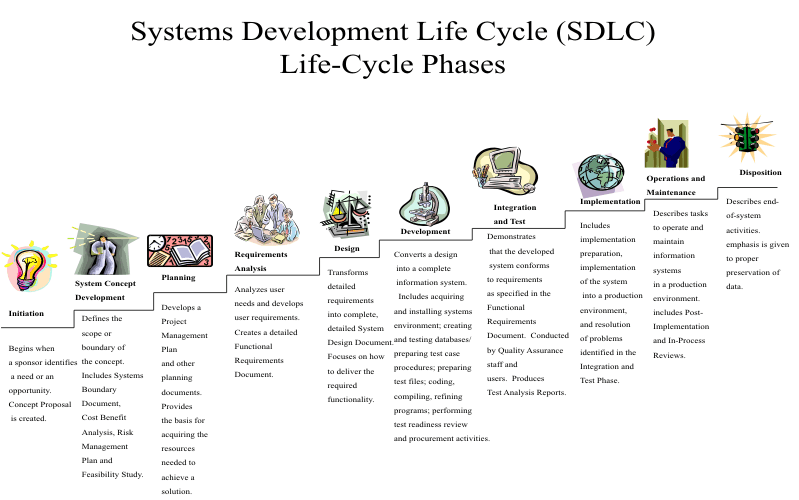
Analyzing Technical Processes for GCP

Architects are involved in many different types of technical processes:

  • Continuos Deployment
  • Continuous Delivery
  • Post-mortem Analysis
  • Development Lifecycle Planning
  • Testing
  • Validation
  • Business continuity
  • Disaster Recovery(DR)

Here we will discuss these processes in relation to business needs and goals. We will learn to focus on and define these processes rather than simply follow them.

The Software development lifecycle are the steps that software, and those who engineer it, goes through from beginning to end to create and host a service. This includes 12 phases. In some cases these are collapsed or combined to fewer, or some are regarded as pre-SDLC steps.

  • Proposal
  • Scope Analysis
  • Planning
  • Requirements Analysis
  • Design
  • Development
  • Integration & Testing
  • Implementing
  • Documentation
  • Operations
  • Maintenance
  • Disposition
SDLC.gif
Software Development Lifecycle - Wikipedia

Every phase does work that is required to produce quality software. It is a cycle because you reiterate over these steps until the software is no longer used. The process could start over after the Maintenance step and begin at any one of these beginning steps. After a software is deployed, the next iteration of that software could be as complex as having another Proposal created by the captains of those duties. Or 2nd time the process iterates, it loops back to the Development phase depending if the next iteration requirements are already known. Proposal, scope analysis, planning and requirements analysis can even be done by non-developers or teams of analysts.

For this reason we’re going to jump right into Planning.

Planning is a step performed by the Project Manager, they’ll create all the spaces which track work, all the spaces where the documentation, solution architect design document, specifications and roadmaps will live. They’ll create the roadmap for the different project phases. They’ll create the templates for spring planning, sprint retros, creation of overarching tasks often called ‘epics’.

This may be done by developers and architects together. The goal is to fully understand the needs and wants of the proposal and find potential ways to meet them. The problem is discussed and ideas are put together to meet those problems. Here the solutions are not designed but considered. Any spikes that are needed to sus out requirements are performed by developers or other engineers. A spike is a short development period where a developer tries a feature to come to some knowledge required for planning a full fledged effort to achieve those requirements in the context of existing systems. Spikes are often isolated to proof of concepts. Proof of concept projects might exist here and iterate back to requirements for an actual project.

In this phase you’re trying to:

  • Grasp the scope of the needs and wants of the proposal
  • Track and assess of all possible solutions
  • Evaluate the cost benefits of the different paths toward a solution

Understanding the scope is a matter of both knowledge of the domain in question: if a mail problem, familiarity with mail operations and development; it is also a matter of systems and software knowledge of the existing infrastructure. Domain knowledge, for example, is knowing that kubernetes secrets are not very secure. Systems and software knowledge, is knowing where you’ll inject and use the google libraries to fetch secrets from GSM. This is precisely why developers, architects, and reliability engineers all engage together in this phase.

When finding solutions for your problem, you need to be able to filter them out without trying them. The solutions you’re filtering in your search are those that aren’t feasible, do not fit your use case, or don’t fit within your limitations. Once you know the limits of the project, you can search for possible solutions. If your Google Secret Manager project has a limit placed on it that it must work for in-house apps and third party apps, the direction you’ll go into will be wildly different than if you weren’t filtering based on this rubric. You’ll also consider if commercial software meets your needs at a better cost than you can.

Purchased or Free and Open Source Software(FOSS) can meets a wide range of use cases faster than developing something new. They also have the benefit of the ability to focus on other easier to solve problems. Purchased software or purchased FOSS support can help offset the costs of provisioning new services. This disadvantages are potential licensing models and costs and being locked into a feature set that doesn’t evolve with your needs.

You can decide to build from scratch, from a framework, or from an opensource project. There are different considerations with each of these. How much modification does ready made software require, what languages and formats does it exist in, do you have to acquire talent to work with it. Consider the lifecycles of the software you use. For instance, if you build docker images from other images, knowing the release cycles of those will help you be able to create new releases at the time new operating systems are released. Paying attention to the popularity and maintainers of the application can help you know if a project has become deprecated. You can avoid deprecated software if you do not want to deal with becoming the new maintainer or updater to the software within your use of it. Or you could choose actively maintained software to fork and modify so that you can roll in security backports from the upstream project into your project.

Scratch allows for full control but involves the most work, most maintenance, most planning, having the team with the talent and skillsets needed, most resolution of issues.

Once you have several viable solutions to consider, spike the one first with the greatest cost benefit. You’ll know this because you can do a Cost Benefit Analysis on all these options we’ve discussed.

Part of Analysis is the cost benefit analysis of meeting the requirements with your various solution options. When asked to justify the decisions in your project you’ll be asked for this and be able to contrast the different values of each solution. As part of this you’ll calculate the ROI for the different options to arrive at the solutions value. At the end of this phase you’ll decide which solutions you’ll pursue in the Design.

As part of the design phase, you’ll plan out how the software will work, the structure of the schemas and endpoints, and the functionality that these will achieve. This phase starts with a high level design and ends in a detailed one.

The High Level design is an inventory of all the top levels of parts of the application. Here you’ll identify how components will interact as well their overarching functions. You might work up UML or mermaid diagrams describing parts and interactions.

The Detailed design is a plan of implementation of each of these parts. These parts will be modularized in though and broken down into the most sensible and efficient anatomies in which for them to exist. Some of the things planned include, error codes or pages, data structures, algorithms, security controls, logging, exit codes and wire-frames for user interfaces.

During the design phase, its best to work directly with the users of the system as you would work with other disciplines during other phases. The Users of a system will have a closer relationship to the requirements. In this phase developers will choose which frameworks, libraries, and dependencies.

Under development, software is created by engineers and built as artifacts which are pushed to a repository. These artifacts are deployed into an operating system either with a package manager, ssh, direct copying, a build process or via Dockerfile commands. Artifacts can have within them code, binaries, documentation, configuration, or raw mime/type files.

In this phase developers might use tools like ‘VSCode’, analysis applications, administration tools; while changes are committed with source control tools that have gitOps attached to them. All these processes are in the domain of an Architect to conceive and track when designing a project.

Developers will also test as part of the commands they give the continuous integration(CI) system. Well before the CI steps are created, the developer has created unit and integration tests and knows the commands to run them so that the automation team can include them in the creation of the CI portion of the development operations. There are language specific unit tests but generally the integration tests the API endpoints and you have a choice of software for that.

Documentation is crucial to the SDLC because it lets others using the software know how to operate the software. This is often your DevOps team handling automation in deployments. Developer documentation can be in the form of inline comments within the code, but also developers should release a manual as a README.md file in the source control repository root. A README.md file should exist in every folder where a different component has different usage instructions.

You entire solution architecture design should be documented. For a lot of companies this is a page in a intranet wiki like Confluence.

This is the practice of keeping the software running and updated. In Agile software practices, developers maintain code and run deployment pipelines to development environments which graduate to higher environments. In a fully agile environment, automation engineers create the pipelines but an automation release team approves the barriers so that developer initiated deployments can be released to production under supervision during a release window.

Keeping a service running includes logging, monitoring, alerting and mitigation. Some of this work includes log rotation and performance scaling. Developers control log messages but infrastructure developers like cloud engineering teams might create the terraform modules that automation engineers use to automatically create alerts and logging policies.

Continuous Integration / Continuous Delivery(CICD)

Section titled “Continuous Integration / Continuous Delivery(CICD)”

Continuous integration is the practice of building code every time there is a change to a code base. This usually starts with a commit to a version control system. If the branch or tag of the commit is part of the rules for the continuous part, then the integration part will take place automatically. Integration pipelines often have built, test, and push steps.

Continuous deployment is often the practice of deploying new artifacts as soon as they are available. If a repository’s continuous integration settings builds a package and places it in the repo, continuous deployment systems polling for new artifacts may trigger a deployment pipeline when it finds one. So once a new version is added to nexus or a deb-repository, CD systems often send that artifact down the line.

The cornerstone of CI/CD is that individual features can be added quickly, unlike the past’s methods which had to weave several new features together into a major release. Instead, new features are built on different feature branches, those feature branches have builds, those builds can be deployed quickly and then once tested the feature branch can be merged into one of the trunks. The version control system acts as an integration engine which takes all these features and incorporates them together, if you’re using trunk based development. In the context of hosted services, users get a risk free but up-to-date experience.

CI/CD is testing heavy. In real life production pipelines, tests are over 50% or more of the pipeline steps and is used throughout the workflows as steps. Automated tests allow the test cases to pass or fail without human intervention. This means that services can be tested with scripted steps, and then deployed if those steps succeed. This prevents deployments and the building of artifacts that do not pass tests.

In certain critical cases, continuous deliver isn’t possible as the safety risk is too high to deploy the latest code. Sometimes code needs to be hand certified and hand installed.

The foundation of Continuous Deployment / Continuous Integration is Version control of software source code. When developers checkout code to work on it and improve it, they get it from a git repository. They make their changes, and push them to the git repository. Git makes a revision and keeps both copies. Points in time in the revisions are called references. Branches and tags are references. You can merge two disparate code bodies by merging two references. A request to merge two references is caled a pull request. So to merge one branch like feature/my-latest-change into develop you’d create a pull request from my ‘feature branch’ into the ‘trunk’ which in this case is develop.

This is how basic version control works with source code. When you commit, often the repository server will notify listening services that code is updated. Those services will look at the repo and if they find a build instruction file they will do the steps listed in the file. This way when we want to build our software, we put all the means to do it in that file. When new commits are made to the repo, listeners will build the application based on our instructions.

If there are no code updates, listeners, or build instructions, there is no continuous part and no integration is happening. In the ancient software world, a developer would commit code and send an integration engineer release notes in an email and the integration engineer would run and babysit a build script while the developer went and got coffee. Now the developer makes a commit and then watches a job console with output logs from the build without communicating with other engineers… they still get coffee while the build runs.

blah

  • blah

Architecting for Reliability

A reliable system is one people can get to now. Reliability is the probability a system can be reached and used without failure and Availability is a measure of how available a system is to be used within a given period of time.

In an environment of constant change, hyper scaling, frequent deployments, and business demand, you cannot maintain reliable systems without metics and insights.

There are some problems you’ll come up against such as needing additional compute power, having to handle seasonal ups and downs, errors or crashing under load, storage filling up, a memory ceiling causes cache to cycle too often and therefore cause latency. The ways things can go wrong a several and in a distributed hyper-scaled environment you’ll run into 1 in a million problems as well. That is why we need detailed information about the operation of the resources in our project.

Cloud Operations Suite which used to be known as Stackdriver has several operations products:

  • Cloud Logging
    • Log Router
  • Cloud Monitoring
    • Alerts
    • Managed Prometheus
  • Service monitoring
  • Latency management
  • Performance and cost management
  • Security management

Cloud Logging has the Log Router which is a built in part of Cloud Logging. The Cloud Logging API receives each log message and then send it to the Log Router which stores log based metrics, an then sends those messages to log sinks which store those entires in logs in a Cloud Storage bucket. Cloud Monitoring receives these log metrics and user defined sinks can send entries to BigQuery for longer storage retention. The default retention for Cloud Logging is 30 das.

Cloud Monitoring is Google’s managed product in which you can setup alerting policies to alert you or your team when things go wrong. Things go wrong in the form of failed health or status checks, metrics over defined thresholds, and failed uptime checks. Policies can be defined so that uptime checks can meet certain requirements. Cloud Monitoring has several integrations for notifications which include Slack and custom webhooks. Alerting Policies are Google’s way of user defined criteria for notifications about problems.

These are the three major services which when combined increase observability into your operations in GCP.

Monitoring is collecting measurements about what hardware, infrastructure and performance. For example, CPU minimum and maximum, CPU averages, disk usage as well as capacity, network throughput and latency, application response times, memory utilization, 1/5/15 minute load averages. These metrics are generally time series. Metrics usually have a timestamp, a name and a value. Sometimes they can have other attributes like labels as is the case in GCP. GCP auto defines metrics but you can define your own metrics using BigQuery queries while having the Log Router send the custom logs to BigQuery. The timestamp is usually epoch time while the value is some value like percent of disk capacity used, web1_disk_usage might be the name of the metric.

Cloud Monitoring has an API which you can query for time series data based on name or resource, offers grouping resource groups based on attribute, list members of resource groups, list metrics and descriptors, listing descriptors of monitored resources and objects.

Some out of the box dashboards are created when you create certain resources such as a Cloud Run instance or a firewall rule, or a Cloud SQL instance. Otherwise you can create the dashboards that you need for your project’s golden signals and other operational metrics that are important to your workload. Users can fully customize them to their needs and to their specific data. Like development, creating dashboards in GCP can often be a cyclical process because you have to create displays which help you quickly diagnose problems at scale. You may start out with planned Key Performance Indicators(KPIs) but then you might drop some and tune into others.

When you monitor for problems and use your metrics data in dashboards, you may move on to automatic alerts so you don’t have to monitor the dashboards. This allows you to notify the correct parties when incidents occur. Normally your cloud infrastructure is structured in a way that auto-healing remediates problems, but in the case where auto healing can’t fix an issue. Crashed pods for instance, are restarted when their liveness probes meet the failure criteria and the RestartPolicy allows for it.

Alerts trigger when time series data goes above or below a certain threshold and can be integrated with third party notifications systems such as MS Teams and Slack. Policies specify these conditions, who to notify, and also specify a way to specify the data you’re selecting the resources to alert on. Conditions are used to determine unhealthy states so they can be fixed. It is up to the architect of the policy to figure out how to define what is unhealthy. It could be a port not responding, an http code, or how long ago a file was written, as long as it can be exposed as a metric.

It is easy to create false or flapping alerts and therefore you’ll have to adjust the timing and thresholds for your conditions. You can also increase reliability by setting automatic remediation responses. When a CPU utilization alert is set, for instance you can add new VMs to a group, you can run a job that runs kubectl patch a kubernetes deployment’s Horizontal Pod Autoscaler(HPA) to raise the replicaCount ceiling and then lower it after load is decreased.

All of Google’s managed products like BigTable and Cloud Spanner do not need to be monitored because Google manages the incident response. Switching to these services can help you reduce the amount of monitoring, notifying and alerting you have overall. Of course the recommended approach on migrating to managed services with regard to alerting is to monitor throughput and latency on managed services though resource monitoring like cpu and memory are not needed on them. This is especially true if you are connecting to in-cloud managed DBs from on-prem workloads through VPN or interconnects. Hybrid and Multi-cloud latencies are metric points of monitoring that should be shown on a dashboard and included in notifications.

Cloud Logging is a log collection service that either has log collection agents or collects logs from managed services like GKE naturally. Log entries are not time series and occur when system events happen. The /var/log/syslog or /var/log/messages in a Linux VM collects messages about several services together, but there are other logs like /var/log/auth.log or /var/log/lastlog. These logs record data about who is currently logged in and the most recent shell sessions respectively. So these logs are only filled when users trigger login events, either on the consol or remotely. Processes may run garbage collection or some kind of file de-fragmentation and print log messages.

Cloud Logging can store logs from any GCP resource or on-premises resource. In Cloud Logging logs can be searched and queried, exported to BigQuery. When you use Cloud Log Analytics log data is automatically exported to BigQuery. You may also choose to send logs to Pub/Sub and have them consumable by third party log software such as Splunk.

The popular free and open source(FOSS) tools such as Prometheus and Grafana can be used with Cloud Monitoring. Prometheus is controlled by the CNFN who controlls Kubernetes. Prometheus scrapes HTTP(S) endpoints and collects data and stores it in a multi-dimensional way based on attributes. This is great for Querying with PromQL the query language used with the project.

Google Managed Prometheus provides a monitoring agent which uses Google’s in-memory time-series database called Monarch. Grafana used in conjunction with Prometheus can display metrics in graphs from several data sources. Grafana has the ability to directly query data sources and monitoring services.

Managing releases are an important part of the software lifecycle development process. Some releases are more involved and more complex than others. Releases are often interdependent and therefore need high levels of planning and coordination on behalf of development teams and release engineering teams. The better release management and deployment strategies you have the more reliable your services will become. In an agile and continuously deployed environment, there are pipelines that deploy new artifacts to dev, test, staging, and production often called intg, qa, uat, and prod. intg and qa are what are considered the lower environments and those experience lower load but a higher and more frequent rate of iterations, so intg and qa get the most deployments. These frequent deployments to development and testing environments allows developers to go back to the planning stage before a change gets to production in the case it doesn’t pass 100% of the tests or function 100% of the time.

So problems are worked out early on and once they get to Unattended Automated Testing(UAT), the programmatic list of tests in a production similar environment under production similar load validates the release to go to production. Some pipelines have fully automated and unimpeded ascents to higher environments, however the more critical workloads in Fortune 500 enterprises all have barriers to production on services that will have customer impact in the case of a release failure.

Even with that, errors get into production and need to be fixed quickly, which is where this release management using DevOps principles of Continuous Deployment allows for a pull request to be merged and tagged, automatically built and polled by the CD triggers, and in minutes be sent out to all the environments ready for the approval barrier to succeed so that the hot fix makes it to production quickly.

This is the best way to rapid produce fixes while reducing risk in releases. In this model, all the access to make release imacting changes are given to the developer who runs these pipelines when needed or when triggered automatically, while some release and integration engineers approve and perform the production runs and service swaps.

Testing in continuous deployment pipelines involves acceptance and regression tests, while unit and integration tests are usually part of Continuous Integration. The exception is that a lot of deployment code might have validations and unit testing as part of their runs. This is the case in terraform Infrastructure as Code(IaC) and with configuration management pipelines like salt and puppet. Tests usually define expected states and the resource being tested say an endpoint such as /health which prints the artifact version. The endpoint is what is checked and the state is the key and value expected. The test for that state passes when the endpoint is fetched and the real value and key are compared to the expected state. If the value was lower than expected the service has regressed and the regression testing will fail. In the case of a unit test, a yaml file might contain input, and the unit test in puppet processes the function and contrasts the output to the expected output that the developer defined in the test. Several of these definitions when related constitute a test that would run before the deployment code executives the active part of the workflow.

Integration tests can exist at all different layers that code exists: in a repository, running as a service, testing dependent APIs. Integration tests can tests for things such as a name longer than the amount of allow characters that the backend will receive per the database schema. Integration tests are different than Unit tests as they span all the units of code together in a running artifact.

Acceptance testing are generally testing if the release being deployed meets the business needs the software was designed to meet such as a customer being able to open a new account, change their account data, review it and delete their account. This is an example of an acceptance test for a root business goal of onboarding new customers.

Some times an automation department will order a whole environment tier just for performance testing and load testing. With this you can understand how your application wil fail or perform under load. You can use load testing to simulate so many transactions per minute. While load testing you can do chaos engineering and make things go wrong to see how customers will be impacted. This teases out bugs, latency tuning problems, memory tuning problems, database connection ceilings and subsequent timeouts.

Service swaps are done typically in a blue green or canary deployment style. There are a few different popular deployment strategies:

  • Big Bang
  • Rolling
  • Canary
  • Blue Green
  • Swap Only
Big BangRollingCanaryBlue Green
Expense$$$$$
Riskvery highhighlowvery low
Complexitylowlowmidhigh

Big Bang deployments, often called “complete” deployments simply update all instances of the software wherever they occur according to the recommended approach in the release notes. On a linux server that uses rpm packages as the method of deployment delivery, a service is stopped, the RPMs are installed with yum, dnf, or rpm directly, database deltas are applied if they are included in the release, and the service is started again. This may happen in series or parallel on all the systems to which it will be applied. This process can be run by script, package configuration and package manager, or a configuration management tool like Ansible, Salt or Puppet. Before continuous deployment was popular, this was the most used deployment style and it was performed manually at first, then with automation.

This is the cheapest as it only ever involves one copy of your infrastructure to be alive at one time.

Rolling deployments are the second cheapest because in some contexts you only need two copies of your infrastructure running while the latest one boots and becomes available. Once its healthy the previous versions are terminated. This is the case with Cloud Run and Kubernetes Pods with regard to rolling deployments. Otherwise with VMs, rolling deployments upgrades one server, tests or problems and then after a time moves onto another until the deployment is rolled out.

This kind of deployment is database delta risky because changes to the database which are not additions might cause 9 out of 10 servers fail running the older version. In this example scenario, 90% of your customers are impacted until the rollout progresses to 2 servers, then 80% suffer until the 3rd server has its deployment updated. If you don’t have db deltas or only ever append to you schemas, the risk is considerably less and only impacting a subset of customers at a time becomes an advantage.

Canary deployments are a type which releases new artifacts to infrastructure that receives a test amount of live traffic. When no errors are detected in the deployment, the rest of the traffic is routed to the new infrastructure. In the case of VMs this can be in the form of creating a new Managed Instance Group(MIG) with a new image that has been built with the new code. It can use its existing disk image but run some configuration management code to perform the upgrade, or it can have a new version label applied to it to be selected for an ssh script which does the deployment. In the case of containers, this comes in the form of a new docker tag, a new docker deployment and some routing magic which is automatically built into services like GKE and Cloud Run. There are several ways to choose users whose traffic is routed to the canary deployment.

Blue Green strategies are those which use two environments, one active while the other is inactive. When deployment pipelines run, they keep track of which service, either blue or green is active. When the deployment workflow performs the release, it releases to the inactive set of infrastructure which is receiving not traffic. Verifications, regressions and production tests validate the inactive deployment and then the workflow switches all the traffic to the new deployment at once.

While the most expensive route because it requires constantly maintaining two copies of identical infrastructure, it mitigates the most risk. Firstly, failed deployments result in a failed iteration and no change in routing therefore customers continue using the older version of the service. Then, if a live active deployment fails, the traffic can be swapped to the inactive service to reinstate an older version of the software without any new releases. The iteration can fail and the developer can take the feedback and begin again fixing the issues and cutting a new release version for a new deployment. In a blue green strategy you have to decide if both versions will connect to the same database. If you ony append to your schema this is fine, otherwise database deltas which edit, rename, remove or change tabes and felids you may consider running a blue and green database, configuring each service with either of these and when swapping the traffic, you change an environment variable selecting the database and restart the service. In kubernetes this is as simple as running kubectl set env on the deployment. You can run this command in swap deployment workflows for pod, replicationcontroller, deployment, daemonset statefulset, cronjob, replicaset.

With blue green deployments you’ll have to also script workflows which swap any urls of the services from active to inactive so that all the active services point to active urls while all the inactive deployments point to inactive endpoints. You can accomplish this in manually in the application config prior to deployment, or you can script this as part of your deployment swap workflows. Inside a GKE namespace, the nginx service is actively routing services to the nginx-blue pod while the nginx-stage service routes to the nginx-green pod. The nginx pods all proxy content for application pods called app. So nginx_blue needs to point its configuration at app_blue, which then connect to database_blue. Both the nginx and the app pods will need their urls swapped via kubectl set env or kubectl patch.

This is the practice of building code with triggers that listen to each commit to a repository or set of repositories. The CI jobs are configured to run syntax validation, vulnerability scanning, unit tests, code quality test uploads, and pushing artifacts to artifact repositories. CI jobs might be single stage, multistage, create java artifacts, create deb and rpm packages and then repackage them in docker files. There are several CI suites which drive integration from Jenkins to Bamboo. Google Cloud Build is googles managed and serverless Continuous Integration product. With it you can host source code in Cloud Source Repositories, or sync them there. Cloud Build Triggers can then listen to the repository and trigger the jobs configured in the cloudbuild.yaml file stored in the triggering repo.

You can also manually build Continuous Integration pipelines. Configuring build pipelines is a much more consistent way to ensure artifact quality than manual integrations and manually running the build steps by hand.

Reliability engineering is mostly about building resiliency in pipelines, in the software, in the performance of services under load. One such example is a vanilla linux postfix mail server which uses linux users and groups as the main source of mail accounts. If users send mail using SMTP auth and check it with Imap, the shadow and passwd files are being queried ever time mail sends and receives. Additionally, when users change their password at the same time, there’s always a chance of collision in that the files in question become corrupted because it suffers form simultaneous writes from two different processes. Not collecting password changes an queuing them one at a time with a success confirmation between each change, that corruption will never happen. The acts of Setting up a message queue to collect password jobs, writing an agent which reads the queue, and does the work while tracking what work as been done successfully or with errors, and what work is undone are all efforts of Reliability Engineering(RE).

RE takes place on any layer of the technology surrounding a service from the code that runs services to the code that deploys services. Ensuring quality on every distinct layer is an SREs job.

Load is something you cannot plan for exactly how much you’ll have. Errors happen at rates because there are certain chances of an error occurring. When you increase load, you not only increase frequency of known errors, you pull out of the chaotic universe higher magnitude errors and lower frequencies. These are you one in a million errors, that say Ticket Master might face every day since they’re doing 100k transactions per second in some cases.

You can guarantee that at some point you’ll experience increased load and need to scale. If you aren’t using a service like Cloud Run’s autoscale then you’ll have to manually configure and reconfigure each service to handle the load per that service’s resource usage. Even in that case if you’re running a Cloud SQL instance you’ll have to vertically or horizontally scale it at some point.

Its best to design for this possibility at the beginning. The more user-facing a service is, the more reliability engineering will surround that service. Internal services and things like batch services which can fail cyclically and then at some point reach eventual processing, we don’t necessarily have to worry about unless we have inter-team SLAs which we have to honor.

You can simply shed load, meaning you can respond to requests greater than a system can handle with error codes instead of the application. This isn’t a clean approach though it is an approach. Based on revenue, business needs, you can shed load from priority services last and tertiary services first.

You can handle overload by degrading the accuracy or quality of the services. Switch ‘contains’ filters to ‘beginswith’ filters to reduce load on the database. Reduce latency everywhere you can but Instead of delivering full images deliver thumbnails to reduce load and restore higher resolution delivery later.

Upstream throttling is another way to deal with overload, you limit the calls or requests that you make on crippled systems. You can cache requests and process them later, enter requests into a message queue and process them later. You can switch from instant operations to queued operations modes, reducing load you can later offload to batch processing like profile edits or other non critical parts of your application. Spotify used a combination of CDNs and peer to peer client network to handle overload. The first 10 seconds of a song are loaded from a server and the rest of the file is loaded from other spotify users who have recently listened to a track.

If you build in a trip switch into your app, and then use monitoring to flip the trip switch, you application can decide to cache requests and process them when batch processes are performed like a wordpress cron job, for instance. You can flip the trip switch back when load returns to normal and the logic in your app will return its mode of behavior to the default behavior. When applications have built-in internal responses to overload, they become more reliable and they can log these occurrences for increase observability.

Cascading failures are those whose effect becomes the cause of another failure. If a database has a disk error, application instances fail, and then proxy instances fail. This is the simplest and easiest form but consider when the application is generally mostly functioning but particular operations are inefficiently written in code and so they create unnecessary cycles. Certain days when certain jobs run and there are intermittent failures, and everything retries three times before completing. This is like cars backing up on the highway because they have to try three times to change into the lane that goes their way. The traffic gets backed up and it affects not only the cars here, but also the cars in queue to arrive here and this can compound and compound and remain a problem long after the initial prime cause is removed from the situation.

In a cascading failure, you may have a resource consumption problem that is the root cause and have issues determining on which system the root cause is happening. You can Upstream throttle in this case, and really apply any overload strategy in this case. If you have increased observability, say a dashboard for every impact causing signal, you can quickly see all the failed services in the cascade. You can have them organized and ordered by dependency so that you eye can go right to the problem. You can order your tests the same way in reverse so that things at the bottom of the stack like database and db disk size are the first tests so that you and run a test to identify the last responding service in a stack to quickly locate the root. So deal with these as you would overload, including using degraded levels of service. Windows introduced safe mode as a way to reliably boot your computer amid problems enabling users to make changes, and fix the issues, rebooting into disabled mode. Windows safe mode boots into a degraded level of service and sheds some load by not enabling it.

When mitigating overload with autoscaling, consider that you need to set the thresholds as low as they need to be so that the load does eat up the resource gap by the time the new resources become available. If you set your Horizontal Pod Austoscalers to add a new replica when one container reaches 90% of CPU resources, but it takes 156 seconds to start a new pod, but only 100 seconds to eat up the remaining 10% of the resources, there will be a period of 56 seconds of unavailability. You’ll need to set your thresholds lower or work on a speedier boot time on our containers.

Scaling down too quickly is also a concern and if your scaling down thresholds are too low, you might create a flapping situation where pods or instances are created and then destroyed repeatedly.

The reason why you want to test is certainly increased observability but also have you ever put a bed-sheet on alone? One change to one area tugs an unexpected change in another area. You have to iterate too many times to arrive at your goals. With testing, you peg values as non-moving targets and the more you add the more of the field you successes and errors you can orient your self against. It’s like pinning the sheet into place on one side while you tighten it on the other side getting out every wrinkle. This ensures that all processes stop right when you make a change that disrupts expected states and values.

Unit tests do this for software, are written and performed by developers and then incudes into the continuous integration process. Integration tests ensure that the units of a feature perform as a whole represented as a function. System tests are those which tests all components under a simple set of conditions that represent sanity checks. System tests that are called performance tests do this same process while placing several repeated requests simulating load. Regression tests are system tests which check to make sure past issues continue to be resolved in future releases. Reliability stress tests are those which do not limit the load but increase it continually until something breaks. The configuration and memory management of a java application, or instance is adjusted and the tests are rerun. You approach this until you exceed at minimum 20% growth over your highest load.

Stress tests are often used to simulate and understand cascading failures. This will inform your monitoring goals and strategy. Chaos engineering puts load on a system an then just randomly causes probably problems to see how the system will respond in order to tease out mitigation responses before they occur.

Incident Management and Post-mortem sessions

Section titled “Incident Management and Post-mortem sessions”

Incidents are major problems. Severe incidences are those that impact services which have Service Level Agreements. Severe incidents can be defined as those which impact multiple teams and multiple different type of customer experiences on the service-level. Incident management is the set of duties surrounding incidents and include remediation and fixing the incident, recording details about the state of the incident as it initially occurred and a history of all the decision surrounding the incident. Incident management duties often include making calls to involved parties in an escalation tree.

  • Notify a captain who coordinates the incident response.
  • Call a working session with available response teams from operations, automation, and development teams.
  • Analyze the problem, make corrections
  • Audit all actions taken into a log for the post-mortem analysis

Incident management focuses on correcting the service-level disruption as soon as possible. There should be less concern with why it failed but how it will be fixed. Incident management focuses on correcting the service-level disruption as soon as possible. There should be less concern with why it failed but how it will be fixed.

The post mortem should focus on a blameless cause of the incident. Blameless postmortems create less of an environment of fear which reduces cognition. Cognition is key to production solutions which fix future versions of this problem. In the spectrum of problems one can have there are patterns, unique to your app, that will form in incidents. If you catch and fix each one, 20% of all fixes will negate 80% of the errors. This zipfy statistic is what allows startups to launch on a startup amount of effort. As an application matures, engineers take on the remaining 80% of fixes which are one offs which apply to fringe cases that only affect 20% of the customers.

Incidents/BugsFixesCustomer Affect
Wide field20%80%
Narrow field80%20%

This zipfy pareto principle is basically a law of nature and governs everything.

Reliability is a measure of how available the system is over a period of time. Creating reliable systems is a discipline involving application design and development, deployment methodologies, Incident management, Continuous Testing and more. Continuous Integration and Delivery managed code releases and bring sanity and mitigate risk in what was traditionally quickly changing process. Systems Reliability Engineering involves software development that includes operations goals, things like safe modes with degraded services or upstream throttling. Architects must understand that systems will fail, and that the best way to live with failures are to have defined service level objectives service level indicators, monitor services to detect incidences, and learn from failures by to risk assessment and mitigation techniques.

  • Understand monitoring, logging, and alerting in gcp and in relation to reliability
  • Be able to design for continuous deployments and integration
  • Be versed in kinds of tests use in reliability engineering
  • Understand that Reliability Engineering(RE) is a collaboration of operations and development goals combined on all levels of the system to reduce the risk of conflicting interests between development and operations.
  • Understand that RE includes planning for unplanned load, cascading failures, and responding to incidents
  • Understand that testing is a cornerstone of reliability engineering